Playbook tasks and icons in the Work Plan
| Task | Description |
|---|---|
 |
An arrow with a light blue square background indicates a standard manual task. The following are kinds of standard tasks.
|
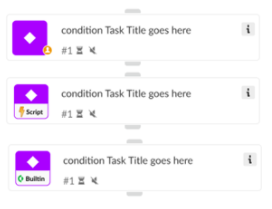 |
A diamond icon in a purple square background indicates a conditional task used as decision trees in your Work Plan. The following are kinds of conditional tasks.
|
 |
The speech bubble in a turquoise background indicates a data collection task. This task prompts the receivers to respond to a multi-question form and submit replies, even if they are not Cortex users. A user icon ( |
 |
The workflow icon in a blue background indicates that the task is a playbook nested within the parent playbook. You can view the playbook by opening the task and selecting Open sub-playbook. |
 | Task containing an error Scripts or sub-playbooks that have errors are designated by a red triangle. You need to open the script or sub-playbook to review the errors. |
 | Task containing a deprecated script or needs to be updated Scripts or sub-playbooks that have updates or are deprecated are designated by a yellow triangle. You need to update the scripts, integration commands, or sub-playbook tasks to their most current version. |
 |
When a task is set to skip, the skip icon will be orange. |
 |
When the Work Plan reaches a breakpoint, the task has an orange line at the top to indicate the breakpoint. |
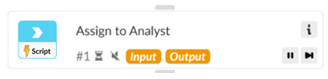 |
When a task is set to have overridden inputs or outputs, the word Input or Output appears in orange. |
 |
When the Work Plan starts to run, all tasks that are about to be performed are gray. |
 |
A spinning circle inside the gray square indicates a running/in progress task. |
 |
The green square indicates a completed task. |
 |
The orange square indicates that the task is pending action. If you hover over the icon on the top left corner, details about the reason the task is in waiting mode appear. The user icon ( A speech bubble icon ( |
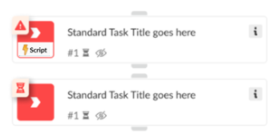 | Failed task The red warning icon indicates that the task failed to complete as expected and requires manual inspection and troubleshooting. Contact your Cortex XDR administrator. If you hover on the icon on the top left corner, details about the specific problem appear. If a red warning icon is paired with the clock icon ( |
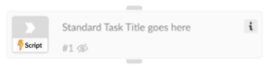 |
The task will look faded to indicate it was not executed. This can happen if this task was set to be skipped when an error occurs, or if it is in a branch that was not executed if a condition wasn’t met. |
 Standard manual task
 ) indicates the task requires manual inputs.
 Conditional task
 Data collection task / Communication task
 Sub-playbook task
 Set to skip
 Breakpoint
 Overridden inputs or outputs
 Pending/in queue task
 Running/ in progress task
 Completed task
 Waiting task
 ) indicates the task is waiting for a questionnaire to be completed.
 ), the task’s SLA is overdue.
 Skipped task