> For the complete documentation index, see [llms.txt](https://cortex-docs.paloaltonetworks.com/llms.txt). Markdown versions of documentation pages are available by appending `.md` to page URLs; this page is available as [Markdown](https://cortex-docs.paloaltonetworks.com/cortex-xdr-5.x/protect-your-endpoints/web-and-api-security-waas/secure-your-api-landscape.md).

# Secure your API landscape

Integrate Cortex XDR with your API Gateway (AWS, Azure, GCP, Kong or F5 BIG-IP LTM) to scan traffic and analyze logs. With Cortex XDR, use the API security features to monitor, manage, and enforce security policies across the integrated API gateways. In addition, the API specification can validate live traffic against specifications and alert on surface deviations, undocumented endpoints, or security gaps.

Refer to the relevant section for more information:

* **Gain visibility and assess risk of API endpoints**
* **Monitor and investigate API threats**
* **Configure API security from end to end**
* **API specification inventory**

### Gain visibility and assess risk of API endpoints

Cortex XDR API endpoints provide an overview of the API assets across cloud providers and data sources (for example: API Gateway, API specification), enabling you to analyze, assess, and implement security measures to safeguard against security risks and potential vulnerabilities.

In addition to observing API traffic, Cortex XDR scans AWS and Azure API gateway, and extracts the API specification files. Once the specification files are in the inventory, Cortex XDR scans them for misconfigurations and vulnerabilities, providing insights into your API landscape.

At a glance, we see a graphical representation of the APIs per cloud provider, including On-prem, and APIs per discovery source, including XDR agent.

![api\_security\_endpoints\_graph.png](/files/RvaxpNY5J1jhpszOLy7L)

You can filter in by provider or by discovery source.

The following table lists the fields that are available for each API endpoint.

| Field                           | Description                                                                                                                                                                                                                                                                                                                                                                                                                                                                                                                                                                                                                                       |
| ------------------------------- | ------------------------------------------------------------------------------------------------------------------------------------------------------------------------------------------------------------------------------------------------------------------------------------------------------------------------------------------------------------------------------------------------------------------------------------------------------------------------------------------------------------------------------------------------------------------------------------------------------------------------------------------------- |
| Server                          | Hosting server of the API.                                                                                                                                                                                                                                                                                                                                                                                                                                                                                                                                                                                                                        |
| Path                            | API endpoint path is used by applications to communicate with the server, enabling you to access data and execute actions.                                                                                                                                                                                                                                                                                                                                                                                                                                                                                                                        |
| API Category                    | Associated category of the API. For example, the API could be associated with **Payment**.                                                                                                                                                                                                                                                                                                                                                                                                                                                                                                                                                        |
| HTTP method                     | <p>The HTTP methods supported include:</p><ul><li>Get</li><li>Post</li><li>Put</li><li>Patch</li><li>Delete</li><li>Head</li><li>Options</li><li>Trace</li><li>Connect</li></ul>                                                                                                                                                                                                                                                                                                                                                                                                                                                                  |
| Risk factors                    | <p>Indication of the risk type associated with the API:</p><ul><li>Internet Exposure (<img src="/files/NXz1LAK0iFDDn5a761p6" alt="internet_exposure_icon.png">)</li><li>Sensitive Data (<img src="/files/cLHt8XZOmzq1FG3QCwTf" alt="sensitive_data.png">)</li><li>No Authentication (<img src="/files/Gb4QPNaC3pURqlzMGJCl" alt="no_authentication.png">)</li><li>No Encryption (<img src="/files/6EaD6mikK7YFFxpfJWwI" alt="no_encryption.png">)</li><li>Insecure Encryption</li><li>Unknown Encryption</li></ul>                                                                                                                                |
| API spec name                   | API specification name is obtained from the `title` field of the specification imported to Cortex XDR.                                                                                                                                                                                                                                                                                                                                                                                                                                                                                                                                            |
| API spec conformance            | <p>Indicates if the endpoint was found/not found in the specification.</p><ul><li><strong>Undefined</strong>: Indicates that the endpoint from the gateway is not found in any known specification document.</li><li><strong>Match</strong>: Indicates there's a match between the API path of the endpoint and a specification.</li><li><strong>Mismatch</strong>: Indicates that the API path is the same in the endpoint and specification, but there is a missing query parameter in the specification.</li><li><strong>Conflict</strong>: Indicates when the API endpoint matches more than one API specification file.</li></ul>            |
| Provider                        | <p>Gateway provider:</p><ul><li>GCP</li><li>AWS</li><li>Azure</li><li>On-Prem</li></ul>                                                                                                                                                                                                                                                                                                                                                                                                                                                                                                                                                           |
| Source                          | <p>Indicates the service from which the data was obtained:</p><ul><li>Kong</li><li>Configuration <img src="/files/6zxFGrKE8wq3M0SbvKTD" alt="source_configuration.png">: Indicates that the source is from the API specification.</li><li>Azure API Management</li><li>Apigee</li><li>Amazon API Gateway</li><li>XDR Agent</li><li>F5 BIG-IP LTM</li></ul>                                                                                                                                                                                                                                                                                        |
| Inspected                       | Number of requests or connections that have been analyzed and verified by Cortex XDR.                                                                                                                                                                                                                                                                                                                                                                                                                                                                                                                                                             |
| Request/Response Sensitive Data | <p>Shows the sensitive data type in the request/response, such as passwords, credit card numbers, SSNs, or bank account numbers. Refer to <strong>What is Cortex Cloud Data Classification?</strong> for more information.</p><div data-gb-custom-block data-tag="hint" data-style="info" class="hint hint-info"><p><strong>Note</strong></p><p>Data classification findings are only available for enabled profiles.</p></div>                                                                                                                                                                                                                   |
| Request/Response Content Types  | <p>Data format sent/received in the request/response of the API calls.</p><ul><li>application/json</li><li>application/xml</li><li>application/x-www-form-urlencoded</li><li>multipart/form-data</li></ul>                                                                                                                                                                                                                                                                                                                                                                                                                                        |
| Request/Response Data Patterns  | Data pattern types such as Credit Card Numbers, SSN, Email Addresses, API Keys.                                                                                                                                                                                                                                                                                                                                                                                                                                                                                                                                                                   |
| Request/Response Data Profiles  | Data profile types such as PCI, GDPR, PII, HIPAA.                                                                                                                                                                                                                                                                                                                                                                                                                                                                                                                                                                                                 |
| Schema                          | <p>Protocol used to access the API resource:</p><ul><li>HTTP</li><li>HTTPS</li></ul>                                                                                                                                                                                                                                                                                                                                                                                                                                                                                                                                                              |
| Authentication Types            | <p>Authentication methods include the following options:</p><ul><li>API key</li><li>Basic</li><li>OAuth</li><li>OIDC</li><li><p>Learning</p><div data-gb-custom-block data-tag="hint" data-style="info" class="hint hint-info"><p><strong>Note</strong></p><p>Indicates that a JSON Web Token was identified, but it is unknown how to determine its type from the given string. It could be a non-standard JSON Web Token creation algorithm.</p></div></li><li>Unknown: Indicates that the authentication method couldn't be identified.</li><li>Authentication not detected: Indicates that the API does not require authentication.</li></ul> |
| Discovery Method                | <p>Based on asset discovery:</p><ul><li>HTTP</li><li>Logs</li><li>Traffic mirroring</li><li>Configuration</li><li>Unknown</li></ul>                                                                                                                                                                                                                                                                                                                                                                                                                                                                                                               |
| Asset Status                    | The API's status is **Active** only when both an API gateway and an API specification are present; otherwise, it's deleted. An **Inactive** status means the endpoint is defined in the specification but isn't receiving traffic via the gateway.                                                                                                                                                                                                                                                                                                                                                                                                |
| Cloud                           | Cloud provider where the agent is running. In case of on-prem, this field shows **On-prem**.                                                                                                                                                                                                                                                                                                                                                                                                                                                                                                                                                      |
| Provider Type                   | <p>Indicates the cloud service provider:</p><ul><li>CSP</li><li>On Prem</li></ul>                                                                                                                                                                                                                                                                                                                                                                                                                                                                                                                                                                 |
| Region                          | Region of the hosting server.                                                                                                                                                                                                                                                                                                                                                                                                                                                                                                                                                                                                                     |

When clicking on a specific API endpoint, a side card opens. Each tab includes detailed information as described.

<details>

<summary>Overview</summary>

Shows the highlights and properties of the API endpoint.

| Field                                                                                                                                                                                                                                                                                                                                                                                                                                                                                                                                                                    | Description                                                                                                                                                                                                                                                                                                                                                                                                                                                                                                                     |
| ------------------------------------------------------------------------------------------------------------------------------------------------------------------------------------------------------------------------------------------------------------------------------------------------------------------------------------------------------------------------------------------------------------------------------------------------------------------------------------------------------------------------------------------------------------------------ | ------------------------------------------------------------------------------------------------------------------------------------------------------------------------------------------------------------------------------------------------------------------------------------------------------------------------------------------------------------------------------------------------------------------------------------------------------------------------------------------------------------------------------- |
| Highlights                                                                                                                                                                                                                                                                                                                                                                                                                                                                                                                                                               | Provides an overview of the status of the asset, such as severity type, internet exposure status, and if it includes sensitive data.                                                                                                                                                                                                                                                                                                                                                                                            |
| Asset ID                                                                                                                                                                                                                                                                                                                                                                                                                                                                                                                                                                 | UAI (Unified Asset Inventory) ID                                                                                                                                                                                                                                                                                                                                                                                                                                                                                                |
| Provider                                                                                                                                                                                                                                                                                                                                                                                                                                                                                                                                                                 | <p>API Gateway:</p><ul><li>AWS</li><li>GCP</li><li>Azure</li><li>Kong</li><li>F5 BIG-IP LTM</li></ul>                                                                                                                                                                                                                                                                                                                                                                                                                           |
| Asset Category                                                                                                                                                                                                                                                                                                                                                                                                                                                                                                                                                           | Either **API Endpoint** or **API Specification**.                                                                                                                                                                                                                                                                                                                                                                                                                                                                               |
| Cloud Region                                                                                                                                                                                                                                                                                                                                                                                                                                                                                                                                                             | Region of the cloud provider.                                                                                                                                                                                                                                                                                                                                                                                                                                                                                                   |
| Asset Groups                                                                                                                                                                                                                                                                                                                                                                                                                                                                                                                                                             | Assigned asset groups to the API endpoint.                                                                                                                                                                                                                                                                                                                                                                                                                                                                                      |
| Applications                                                                                                                                                                                                                                                                                                                                                                                                                                                                                                                                                             | <p>Shows the business applications related to the API endpoint. Clicking the application opens the <strong>business application</strong> page.</p><div data-gb-custom-block data-tag="hint" data-style="info" class="hint hint-info"><p><strong>Note</strong></p><p>To link APIs to business applications, the two prerequisites must be met:</p><ul><li>The VM must have XDR agent with WAAS enabled.</li><li>Applications must be defined in <strong>Application Security Posture Management</strong> (ASPM).</li></ul></div> |
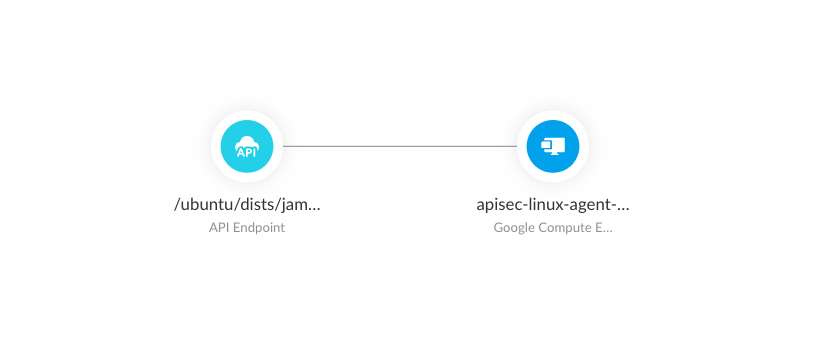
| Relations                                                                                                                                                                                                                                                                                                                                                                                                                                                                                                                                                                | <p>The <strong>Relations</strong> graph shows the connections between the API endpoint, API gateway, and VMs. This mirrors what's shown in the <strong>Graph Search</strong>.</p><p>Click the API Gateway or API Endpoint to view more details about the asset.</p><p><img src="/files/qpBLapSTkqucBvWlDZng" alt="relations_search_graph" data-size="original"></p>                                                                                                                                                             |
| Account ID                                                                                                                                                                                                                                                                                                                                                                                                                                                                                                                                                               | Cloud account ID.                                                                                                                                                                                                                                                                                                                                                                                                                                                                                                               |
| Cases/Issues/Findings                                                                                                                                                                                                                                                                                                                                                                                                                                                                                                                                                    | <p>The link from the number opens the page where you can review the details. Refer to <strong>Cases and issues</strong> for detailed information.</p><p>You can view all API security issues and cases detected by Cortex XDR.</p>                                                                                                                                                                                                                                                                                              |
| <p><strong>Related Assets</strong></p><p>Shows the data from the source of the traffic.</p><ul><li>If the source of the traffic is from the gateway, the related asset data shows AWS API Gateway or Azure Gateway, the name of the gateway, and the stage.</li><li>If the source of the traffic is from a specification from the gateway, the related asset data shows the API specification, the name of the specification, and the gateway provider.</li><li>If the source of the traffic is from the XDR agent, the related asset data shows the agent ID.</li></ul> |                                                                                                                                                                                                                                                                                                                                                                                                                                                                                                                                 |
| Type                                                                                                                                                                                                                                                                                                                                                                                                                                                                                                                                                                     | API specification                                                                                                                                                                                                                                                                                                                                                                                                                                                                                                               |
| Name                                                                                                                                                                                                                                                                                                                                                                                                                                                                                                                                                                     | Name of the API specification.                                                                                                                                                                                                                                                                                                                                                                                                                                                                                                  |
| Provider                                                                                                                                                                                                                                                                                                                                                                                                                                                                                                                                                                 | Cloud provider of the API specification.                                                                                                                                                                                                                                                                                                                                                                                                                                                                                        |

An issue is generated when the following **Detection Method** is triggered:

| Deployment option     | Detection Method and Type                                                                 | Description                                                                                                                                      |
| --------------------- | ----------------------------------------------------------------------------------------- | ------------------------------------------------------------------------------------------------------------------------------------------------ |
| Agentless for Posture | **Detection Method**: API Posture Scanner                                                 | If Cortex XDR detects security vulnerabilities or compliance issues in the posture of an API during scanning, an issue is generated.             |
| Agentless             | **Detection Method**: API Traffic Scanner                                                 | If Cortex XDR detects anomalies, suspicious activities, or potential security threats in the network traffic of the APIs, an issue is generated. |
| Agent-based           | <p><strong>Type</strong>: Security</p><p><strong>Detection Method</strong>: XDR Agent</p> | If Cortex XDR detects threats from cloud workloads, an issue is generated.                                                                       |

</details>

<details>

<summary>Endpoint Data</summary>

Shows the details of the API endpoint, and the components associated with authentication, such as token type, request/response body schema, and usage statistics.

| Field                        | Description                                                                                                                                                                                                                                                                                                                                                                                                                                                                                                                                                                                                                                                                                                                                                                                                                                                                                                                                                          |
| ---------------------------- | -------------------------------------------------------------------------------------------------------------------------------------------------------------------------------------------------------------------------------------------------------------------------------------------------------------------------------------------------------------------------------------------------------------------------------------------------------------------------------------------------------------------------------------------------------------------------------------------------------------------------------------------------------------------------------------------------------------------------------------------------------------------------------------------------------------------------------------------------------------------------------------------------------------------------------------------------------------------- |
| API Endpoint                 | API endpoint path used by applications to communicate with the server, enabling you to access data and execute actions.                                                                                                                                                                                                                                                                                                                                                                                                                                                                                                                                                                                                                                                                                                                                                                                                                                              |
| Method                       | HTTP Method.                                                                                                                                                                                                                                                                                                                                                                                                                                                                                                                                                                                                                                                                                                                                                                                                                                                                                                                                                         |
| Server                       | Hosting server of the API.                                                                                                                                                                                                                                                                                                                                                                                                                                                                                                                                                                                                                                                                                                                                                                                                                                                                                                                                           |
| Query Parameters             | Parameters included in the API endpoint URL. Only the keys are stored to avoid saving personal identifiable information (PII)? For example, ID.                                                                                                                                                                                                                                                                                                                                                                                                                                                                                                                                                                                                                                                                                                                                                                                                                      |
| Response Content Type        | Specifies the response type format transmitted from the server to the client, such as JSON or XML.                                                                                                                                                                                                                                                                                                                                                                                                                                                                                                                                                                                                                                                                                                                                                                                                                                                                   |
| Inspected Transactions       | Number of requests scanned by Cortex XDR.                                                                                                                                                                                                                                                                                                                                                                                                                                                                                                                                                                                                                                                                                                                                                                                                                                                                                                                            |
| First Observed/Last Observed | Timestamp of the first and last time the API was accessed.                                                                                                                                                                                                                                                                                                                                                                                                                                                                                                                                                                                                                                                                                                                                                                                                                                                                                                           |
| Last Changed                 | Timestamp of when the API was updated.                                                                                                                                                                                                                                                                                                                                                                                                                                                                                                                                                                                                                                                                                                                                                                                                                                                                                                                               |
| Sensitive Data Pattern       | Identifies sensitive data exposure risks.                                                                                                                                                                                                                                                                                                                                                                                                                                                                                                                                                                                                                                                                                                                                                                                                                                                                                                                            |
| Authentication               | Specified the authentication of the API endpoint. Refer to Authentication Types.                                                                                                                                                                                                                                                                                                                                                                                                                                                                                                                                                                                                                                                                                                                                                                                                                                                                                     |
| Request/Response Body Schema | <p>Shows the structure and format of the data that's included in the request. It shows expected data types, format, and organization of the response payload, such as the fields, attributes, and valid values.</p><p>The schema is created based on the request/response.</p><p>Cortex utilizes the <a href="https://docs-cortex.paloaltonetworks.com/r/Cortex-CLOUD/Cortex-Cloud-Posture-Management-Documentation/Cortex-Cloud-Data-Security">DSPM</a> engine to analyze API traffic and classify sensitive data into two categories: <strong>Data Profiles</strong> and <strong>Data Patterns</strong>.</p><ul><li><p>Data Profiles: Represent the regulatory standards and compliance mandates that the API data is subject to.</p><p>Example: PCI, GDPR, PII, HIPAA</p></li><li><p>Data Patterns: specific data types and formats found within the API requests and responses.</p><p>Example: Credit Card Numbers, SSN, Email Addresses, API Keys</p></li></ul> |
| Usage Statistics             | <p>Shows the metrics for <strong>Requests size distribution</strong>, <strong>Response size distribution</strong>, and <strong>Status code distribution</strong>. Using these statistics can help assess usage patterns, identify performance issues, and help optimize the API to enhance its security posture.</p><p>You can hover over the metric bar to view details.</p>                                                                                                                                                                                                                                                                                                                                                                                                                                                                                                                                                                                        |

</details>

### Monitor and investigate API threats

Cortex XDR provides a comprehensive solution to counter API threats and attacks. It doesn't just address vulnerabilities, but actively protects against the misuse of legitimate API functions, mitigates risks from misconfigurations, and secures often-forgotten "shadow" or "zombie" APIs. By offering continuous visibility and monitoring, Cortex XDR ensures robust, proactive protection for all your APIs, safeguarding your organization against evolving and sophisticated threats.

Cortex XDR protects from the following threats:

| Module                               | Threat description                                                                                                                                                                                                                                                                                                                                                                                                                                                                                                                                                                                                                   |
| ------------------------------------ | ------------------------------------------------------------------------------------------------------------------------------------------------------------------------------------------------------------------------------------------------------------------------------------------------------------------------------------------------------------------------------------------------------------------------------------------------------------------------------------------------------------------------------------------------------------------------------------------------------------------------------------ |
| Advanced Threat Protection           | Advanced Threat Protection (ATP) is a comprehensive security feature designed to detect, prevent, and respond to sophisticated Web and API threats, ensuring robust protection for workloads against evolving risks.                                                                                                                                                                                                                                                                                                                                                                                                                 |
| Authentication bypass                | The Cortex XDR authentication bypass module protects against attacks that attempt to circumvent authentication controls through session manipulation, token exploitation, or credential abuse.                                                                                                                                                                                                                                                                                                                                                                                                                                       |
| Automation tools                     | Cortex XDR detects and protects against automated tools or services that scrape website contents such as Scriptable headless web browsers, command line tools, or HTTP libraries.                                                                                                                                                                                                                                                                                                                                                                                                                                                    |
| Cross-Site Scripting (XSS) injection | Cortex XDR protects against XSS attacks, in which malicious JavaScript snippets are injected into otherwise benign and trusted websites. In such attacks, attackers try to trick the browser into switching to a JavaScript context and executing arbitrary code.                                                                                                                                                                                                                                                                                                                                                                    |
| CVE exploits                         | Cortex XDR protects against exploitation attempts of known vulnerabilities (Common Vulnerabilities and Exposures (CVEs)).                                                                                                                                                                                                                                                                                                                                                                                                                                                                                                            |
| Malformed Traffic                    | Cortex XDR identifies and protects against HTTP requests with anomalies that are not expected from common web browsers.                                                                                                                                                                                                                                                                                                                                                                                                                                                                                                              |
| Injection attacks                    | Injection attacks are a form of attacks in which attackers attempt to insert malicious input into an application to manipulate its execution. For example, a code injection attack injects code which is interpreted by the application or other runtimes. Command and code payloads can either be injected as part of HTTP requests, or are included from local or remote files (also known as File Inclusion attacks).                                                                                                                                                                                                             |
| Known bots                           | Cortex XDR can identify legitimate bots that properly declare their identity and purpose, such as search engine crawlers and authorized web indexers. These bots follow standard protocols and provide verifiable operator information, however some of them might cause undesirable behaviors, such as spam, and you might prefer to block such bots.                                                                                                                                                                                                                                                                               |
| Offensive tools                      | Cortex XDR identifies offensive tools that scan web applications for known security vulnerabilities and misconfiguration, and exploit them.                                                                                                                                                                                                                                                                                                                                                                                                                                                                                          |
| Sensitive data exposure              | <p>Cortex XDR protects workloads from providing responses that could expose sensitive data found in critical system files, including password hashes (/etc/shadow), user account information (/etc/password), and private encryption keys.</p><p>Such examples would be compromised accounts, credential stuffing, and ATO attacks.</p>                                                                                                                                                                                                                                                                                              |
| SQL injection (SQLi)                 | Cortex XDR protects against SQLi attacks, which can occur when an attacker successfully inserts a malicious SQL query into the input fields of a web application. A successful attack can read sensitive data from the database, modify data in the database, or run arbitrary commands.                                                                                                                                                                                                                                                                                                                                             |
| Identity-based attacks               | <p>Cortex XDR identifies and protects from compromised accounts, credential stuffing, and ATO attacks. These types of attacks involve exploiting stolen or weak login credentials to impersonate legitimate users and gain unauthorized access to accounts and systems.</p><p>The API inventory's category by type (e.g., login, sign-in, sign-up, register, create account, reset password) and sub-type (e.g., add to cart, show cart, general checkout page, add billing address, add credit card, gift card) is crucial. This enables a deeper investigation into potential discrepancies related to identity-based attacks.</p> |

#### SOC analyst workflow

The following workflow outlines a step-by-step action plan as a SOC analyst to monitor, investigate, and respond to API threats.

**SOC analyst role overview**

SOC analysts continuously monitor and analyze security incidents related to APIs. Their goal is to identify, investigate, and mitigate API endpoint attacks, ensuring API integrity, confidentiality, and availability. They prioritize issues based on severity and specific indicators.

* ISSUE DOMAIN: Security
* DETECTION METHOD: API Traffic Monitor
* SEVERITY: High or Critical

**SOC analyst action plan**

The following outlines the streamlined actions a SOC analyst takes when detecting an API threat:

**Step 1:** Initial examination (Cases & Issues):

* **Objective**: Quickly assess the type and severity of the API attack.
* **Actions**: Navigate to **Issues**, filter by key indicators, and review the high-level alert summary (timestamp, affected service, initial notes).

**Step 2:** In-depth analysis (Issue page - Overview tab):

* **Objective**: Gather detailed attack context, identify affected assets, and collect evidence.

  The API security issues page provides a single window into every API security threat. You get full investigation capabilities that let you immediately drill down to understand the true impact of the attack. An important insight into the issue, you can see the specific details of the attacker and the credentials that were used. All the details included give you a deep understanding of the complete attack narrative.
* **Actions**:
  * **Affected Assets**: Identify targeted API endpoints; click to navigate to their detailed pages for granular review.
  * **Evidence**: Examine findings (request/response logs, payload, timestamps, source IP, user agent) to understand the attack vector.
  * **Advance your investigation**: The issue page also provides you with advanced investigation options to further analyze the attack narrative.

    Select one of the options:

    * **Trace the Actor**: Gain full visibility into the actor's complete interaction sequence by viewing all raw API traffic. This allows you to understand every step they took, ensuring nothing is missed in your analysis.

      Click **Run** to run a preconfigured XQL query.
    * **Hunt for the Payload**: Search is extended to include encoded and modified variations of the attack payload across all API traffic. This comprehensive detection capability ensures you find every single instance of the attack attempt, regardless of how the payload was obscured or altered.

      Click **Run** to run a preconfigured XQL query.
    * **Scope the Threat**: Access a chronological record of all historical security issues tied to this specific API endpoint. Analyzing this data allows you to quickly identify attack patterns and pinpoint inherent vulnerabilities in the endpoint, enabling targeted hardening and risk reduction.

      Click **Go**, which takes you directly to the **Issues** table to see all historic issues related to the attacked API endpoint.
    * **Build the Attack Chain**: Instantly display all historical security issues previously triggered by this actor. This automatically generates a clear, chronological timeline of their malicious activities, enabling you to understand their patterns, escalation, and overall risk profile.

      Click **Run** to run a preconfigured XQL query.

    ![issues\_api\_endpoints\_page](/files/8mnHyURq5V5gnUJsg0aH)

**Step 3:** Refer to **Gain visibility and assess risk of API endpoints** for drilled-down details of the API data.

**Step 4:** Post-investigation actions & reporting:

* **Objective**: Mitigate the threat, prevent recurrence, and document findings.
* **Actions**:
  * **Reporting**: Create a detailed incident report (detection, attack type, assets, evidence, vulnerabilities, actions, lessons learned). Communicate findings to stakeholders.
  * **Improvement**: Conduct post-incident review, update policies/playbooks, and recommend security enhancements.

### Configure API security from end to end

Implementing end-to-end API security means establishing comprehensive protection across the entire API lifecycle. This process begins by integrating with third-party cloud providers to enable thorough scanning of your APIs for threats and vulnerabilities. Following this, you'll configure profiles for agent-based protection, which actively safeguards your APIs in real-time. This ensures that every potential vulnerability, from authentication and authorization issues to data encryption and threat monitoring, is addressed across your entire API ecosystem.

For more information on how to configure, refer to:

* **Third-party integrations**
* **Agent-based protection**

#### Third-party integrations

Easily configure the settings in both Cortex XDR and your cloud service to retrieve and collect API data for further analysis by Cortex's comprehensive **API security** capabilities, which provide a transparent view of API traffic, helping to identify potential security threats.

**Ingest AWS API Gateway**

Integrate AWS API Gateway with Cortex XDR to begin scanning the APIs for potential threats and vulnerabilities.

<details>

<summary>Settings in Cortex XDR</summary>

In Cortex XDR, set up the **AWS API Gateway** data source to integrate with the AWS API Gateway.

1. From **Settings** → **Data Sources** , click ![add\_data\_source.png](/files/vzdVYm1DD2KIDGu3DfEO) and search for **AWS API Gateway** and then click **Connect** or **Connect Another Instance**.
2. In the **AWS API Collector** wizard, enter a relevant name and click **Create and Proceed**.
3. Copy the key and save it for later.

   <div data-gb-custom-block data-tag="hint" data-style="info" class="hint hint-info"><h3>Note</h3><p>You must generate a new key if you did not save.</p></div>
4. Click **Close**.

</details>

<details>

<summary>Settings in AWS Management Console</summary>

Configure the settings in the AWS Management Console to integrate with Cortex XDR:

1. Log in to the [AWS Management Console](https://aws.amazon.com/console/).
2. In AWS Management Console, navigate to **API Gateway**.
   1. Expand the left-hand menu of the API project.
   2. Go to **Settings** → **Logging** and click **Edit**. Verify that the **CloudWatch log role ARN** is filled.
   3. Click **Stages** and from **Stages**, select the relevant stage.
   4. From **Logs and Tracing**, click **Edit** and configure the following:
      * **CloudWatch Logs**: Select **Errors and info logs**
      * Select **Data tracing**
      * Select **Detailed metrics**
   5. Click **Save**.

      This creates a unique log group inside CloudWatch.
3. Open CloudWatch in another window by typing **CloudWatch** in the search bar.
   1. Go to **Logs** → **Log groups** and search for the log group just created.

      The group name follows the following format: `“API-Gateway-Execution-Logs_<gw ID>/<stage name>”`
   2. Click the log group, and from the **Log group details**, copy the **ARN**.
4. Return to **Edit logs and tracing**, go to **enable the custom access logging** , and paste the ARN without the \* in the **Access log destination ARN** field.

   Example 91.

   ARN: `arn:aws:logs:us-east-1:123456789012:log-group:API-Gateway-Execution-Logs_153tp249k2/Prod:*`

   Paste in **Access log destination ARN**: `arn:aws:logs:us-east-1:123456789012:log-group:API-Gateway-Execution-Logs_153tp249k2/Prod`
5. In **Log format**, type the following and click **Save**:

   ```programlisting
   ($context.requestId)
   accountID: $context.accountId ;
   requestTimeMs: $context.requestTimeEpoch ;
   path: $context.path ;
   region: us-east-2 ;
   apiID: $context.apiId ;
   stage: $context.stage ;
   extensionVersion: 1.0
   ```
6. Click **Create Firehose stream**.
   1. Configure the following:
      * **Source**: **Direct PUT**
      * **Destination**: **HTTP Endpoint**
      * **Firehose stream name**: Add a relevant name.
   2. In **Destination settings**, configure the following:
      * **HTTP endpoint URL** : Add the API URL from Cortex XDR.
      * **Authentication**: Select **Use access key**.
      * **Access key**: Paste the generated token from **AWS API Gateway**.
      * **Content encoding**: Select **GZIP**.
   3. In **Backup settings**, configure the following:
      * **Source record backup in Amazon S3**: select **Failed date only**.
      * **S3 backup bucket**: select a bucket or enter a bucket URI.
   4. Click **Create**.

      It takes up to 5 minutes for the stream to be activated.
7. Refer to [Subscription filters with Amazon Data Firehose](https://docs.aws.amazon.com/AmazonCloudWatch/latest/logs/SubscriptionFilters.html#FirehoseExample). To create an IAM Role and provide CloudWatch with the appropriate permissions for the streaming, refer to steps 8-11.

   After the Data Firehose delivery stream is active and you have created the IAM role, you can create the CloudWatch Logs subscription filter. The subscription filter immediately starts the flow of real-time log data from the chosen log group to your Amazon Data Firehose delivery stream:

   ```programlisting
   aws logs put-subscription-filter \
       --log-group-name "<YOUR_LOG_GROUP_NAME>" \
       --filter-name "<any_filter_name>" \
       --filter-pattern "" \
       --destination-arn "arn:aws:firehose:region:123456789012:deliverystream/<YOUR_DELIVERY_STREAM>" \
       --role-arn "arn:aws:iam::<ACCOUNT_ID>:role/<YOUR_IAM_ROLE>"
   ```

   <div data-gb-custom-block data-tag="hint" data-style="info" class="hint hint-info"><h3>Important</h3><p>Leave <code>–filter-pattern</code> empty as displayed above.</p></div>

   After you create the filter, go back to **Data Sources** → **AWS API Gateway** to see the logs starting to come in.

   <div data-gb-custom-block data-tag="hint" data-style="info" class="hint hint-info"><h3>Note</h3><p>If no logs are showing, send some API requests on Postman or CURL.</p></div>

</details>

**Ingest Azure APIM**

{% hint style="info" %}

### Notice

Requires the Data Collection add-on.
{% endhint %}

Integrate Azure APIM with Cortex XDR to start scanning its APIs for potential threats and vulnerabilities.

You need to set up a policy that enables you to customize the behavior of managed APIs. You can configure the sending of HTTP request/response data to Cortex XDR. The data is saved and analyzed by API security modules, which provide information on the security risks associated with the APIs.

{% hint style="info" %}

### Note

Microsoft Azure APIM service must be running before starting to configure the integration.
{% endhint %}

<details>

<summary>Settings in Cortex XDR</summary>

In Cortex XDR, set up the **Azure API Management** data source to integrate with the Azure API Gateway.

1. From **Settings** → **Data Sources & Integrations** , click **+ Add New**, search for **Azure API Management**, then hover over it and click **Add** or **Add Instance**.
2. In the **APIM Collector** wizard, enter a relevant name and then click **Create and Proceed**.
3. Copy the key and paste it somewhere so that you can access it for later.

   If you forget to record the key and close the window, you must generate a new key and repeat this process.
4. Click **Close**.

</details>

<details>

<summary>Settings in Azure APIM policy</summary>

Configure an inbound and outbound policy to send HTTP traffic data of the APIs to Cortex XDR. You can configure a policy for individual operations (endpoints) or all operations of a single API.

Follow the steps to configure the policy.

1. Log in to [Microsoft Azure](https://portal.azure.com/).
2. Go to **API Management services** and select the relevant service.
3. From the left-hand menu, select APIs → Named values.

   <div data-gb-custom-block data-tag="hint" data-style="info" class="hint hint-info"><h3>Note</h3><p>From the URL, save the UUID and the resource group - <code>/resource/subscriptions/&#x3C;UUID>/resourceGroups/&#x3C;ResourceGroup></code>.</p><p>The UUID is the Azure account/subscription ID and the resource group, which is the group where the APIM Service is defined.</p></div>
4. Configure the settings in each of the sections. Follow the steps in the order they are listed.

   <div data-gb-custom-block data-tag="hint" data-style="info" class="hint hint-info"><h3>Note</h3><p>Use the search to navigate to the specific section.</p></div>

   **Named values**: Add the values:

   * cloud-account-id
     * **Type**: Plain
     * **Value**: The UUID you saved from the previous step.
   * cloud-resource-group
     * **Type**: Plain
     * **Value**: The resource group you saved from the previous step.
   * cortex-api-key
     * **Type**: Secret
     * **Value**: The token that you saved from data sources in Cortex.
   * cortex-api-url
     * **Type**: Plain
     * **Value**: The API URL from data sources in Cortex.
   * cortex-http-body-size-limit-bytes
     * **Type**: Plain
     * **Value**: 131072

       <div data-gb-custom-block data-tag="hint" data-style="info" class="hint hint-info"><h3>Note</h3><p>131072 bytes = 128 KB. This value determines the size (in bytes) of request and response bodies to send to Cortex. Any bytes beyond this limit are truncated.</p></div>

   **APIs**: From the left-hand menu, go to APIs → APIs.

   1. You can create a policy on a specific API or choose to create a policy on all APIs.
   2. From **Inbound Processing**, click ![code\_bracket.png](/files/SWnNGhVdf8EdGKxC8SOs).

      The Policies screen opens. There are three sections:

      * `<inbound>`
      * `<backend>`
      * `<outbound>`

      The `<inbound>` includes the request before it's sent to the `<outbound>`. The parameters are saved before they're sent.

      Add the following inside the `<inbound>`:

      ```programlisting
       <!-- Save the request body and headers to be sent to Cortex. This should always be placed at the very beginning of the inbound element. -->
              <set-variable name="requestBody" value="@((context.Request?.Body?.As<string>(preserveContent: true)) ?? string.Empty)" />
              <set-variable name="requestHeaders" value="@(JsonConvert.SerializeObject(context.Request.Headers))" />
              <!-- End of setting variables for sending to Cortex --><!-- Save the request body and headers to be sent to Cortex. This should always be placed at the very beginning of the inbound element. -->
              <set-variable name="requestBody" value="@((context.Request?.Body?.As<string>(preserveContent: true)) ?? string.Empty)" />
              <set-variable name="requestHeaders" value="@(JsonConvert.SerializeObject(context.Request.Headers))" />
              <!-- End of setting variables for sending to Cortex -->
      ```

      <div data-gb-custom-block data-tag="hint" data-style="info" class="hint hint-info"><h3>Note</h3><p>If any other inbound policies should be added, they must be added after these elements.</p></div>

      The `<outbound>` includes the request before it returns a response.

      Add the following inside the \<outbound> element, at the end, after the other child elements:

      ```programlisting
       <!-- Send data to Cortex. This should always be placed at the very end of the outbound element. -->
              <send-request mode="new" response-variable-name="mirrorMessage">
                  <set-url>{{cortex-api-url}}</set-url>
                  <set-method>POST</set-method>
                  <set-header name="Content-Type" exists-action="override">
                      <value>application/json</value>
                  </set-header>
                  <set-header name="Authorization" exists-action="override">
                      <value>{{cortex-api-key}}</value>
                  </set-header>
                 <set-body>@{
                              string requestBody = context.Variables.GetValueOrDefault<string>("requestBody");
                              string responseBody = context.Response.Body.As<string>(preserveContent: true);
                              int bodySizeLimit = {{cortex-http-body-size-limit-bytes}};
                              bool requestBodySizeExceedsLimit = requestBody.Length > bodySizeLimit;
                              bool responseBodySizeExceedsLimit = responseBody.Length > bodySizeLimit;

                              return JsonConvert.SerializeObject(new {
                                  accountId               = "{{cloud-account-id}}",
                                  serviceId               = context.Deployment.ServiceId,
                                  requestId               = context.RequestId,
                                  url                     = context.Request.OriginalUrl,
                                  httpMethod              = context.Request.Method,
                                  requestBody             = requestBodySizeExceedsLimit ? requestBody.Substring(0, bodySizeLimit) : requestBody,
                                  requestBodyTruncated    = requestBodySizeExceedsLimit,
                                  requestHeaders          = JsonConvert.DeserializeObject(context.Variables.GetValueOrDefault<string>("requestHeaders")),
                                  timestamp               = new DateTimeOffset(context.Timestamp).ToUnixTimeMilliseconds(),
                                  requestIpAddress        = context.Request.IpAddress,
                                  statusCode              = context.Response.StatusCode,
                                  responseBody            = responseBodySizeExceedsLimit ? responseBody.Substring(0, bodySizeLimit) : responseBody,
                                  responseBodyTruncated   = responseBodySizeExceedsLimit,
                                  responseHeaders         = context.Response.Headers,
                                  region                  = context.Deployment.Region,
                                  subscription            = context.Subscription,
                              });
                          }
                  </set-body>
              </send-request>
              <!-- End of sending data to Cortex -->
      ```

      <div data-gb-custom-block data-tag="hint" data-style="info" class="hint hint-info"><h3>Important</h3><p>If you want to add additional data to the &#x3C;outbound>, add it at the start of the &#x3C;outbound> code.</p></div>
   3. Click **Save**. Your APIM traffic collection is now configured.

      Request and response data for the configured endpoints are sent to Cortex XDR for inspection by API security modules.
5. Go to **Azure API Management** data source to validate that data is ingested from Azure APIM.
6. Do the following to remove the integration of Azure APIM with Cortex XDR:
   * Remove the snippets you added to the policies.
   * Remove the named values from the API service.
   * Delete the HTTP log collector from **Data Sources & Integrations** in Cortex.

</details>

**Ingest Apigee Proxy**

{% hint style="info" %}

### Notice

Requires the Data Collection add-on.
{% endhint %}

Integrate Apigee Proxy with Cortex XDR to begin scanning the APIs for potential threats and vulnerabilities.

The integration uses the Apigee’s JavaScript (JS) policy, implemented within a shared flow and deployed as a pre-proxy and post-proxy flow-hook in selected environments. The JS policy is designed to capture both request and response data from all traffic entering and exiting the proxy.

<details>

<summary>Settings in Cortex XDR</summary>

In Cortex XDR, set up the **Apigee** data source to integrate with the Apigee Gateway.

1. From **Settings** → **Data Sources & Integrations** , click **+Add New**, search for **Apigee**, then hover over it and click **Add** or **Add Instance**.
2. In the **Apigee Collector** wizard, enter a relevant name and then click **Create and Proceed**.
3. Copy the key and paste it somewhere so that you can access it for later.

   If you forget to record the key and close the window, you must generate a new key and repeat this process.
4. Click the **Download Configuration Script** link to download the plugin, which you can then upload from the Apigee Gateway.
5. Click **Close**.

</details>

First, download the resource file and then select the method to set up the integration with Apigee.

<details>

<summary>Run an automated script to deploy configurations to Apigee</summary>

Use the script for full deployment (with or without connecting a flow hook).

{% hint style="info" %}

### Note

The steps include the prerequisites that run the automated script that deploys files and configurations to Apigee. For manual configuration, refer to the section Manual deployment.
{% endhint %}

1. Edit `deploy.sh` and add values for the following:

   | Variable         | Description                                                                                                                                 |
   | ---------------- | ------------------------------------------------------------------------------------------------------------------------------------------- |
   | PROJECT\_ID      | Google project ID where Apigee is provisioned.                                                                                              |
   | ORG              | Apigee organization. By default, this is the same as PROJECT\_ID.                                                                           |
   | ENV              | In Apigee, from the left-side menu, click **Environments** and copy the name of the environment you want to use.                            |
   | TARGET\_URL      | Copy the URL for your Apigee Collector from the **Custom Collectors** page. For example, `https://api-{tenant external URL}/logs/v1/event.` |
   | APIsec\_API\_KEY | Token generated from Cortex XDR.                                                                                                            |
2. Check that the GCP user running the script has `IAM` permissions.

   ```programlisting
   apigee.resourcefiles.list
   apigee.resourcefiles.create
   apigee.resourcefiles.update
   apigee.sharedflows.get
   apigee.sharedflows.create
   apigee.deployments.create
   apigee.sharedflowrevisions.deploy
   apigee.flowhooks.attachSharedFlow
   apigee.keyvaluemaps.create
   apigee.keyvaluemaps.delete
   apigee.keyvaluemapentries.create
   ```
3. Run the `deploy.sh` script:

   ```programlisting
   chmod +x
   ./deploy.sh
   ```
4. Verify that the JavaScript policies have been added to the shared flows:

   Go to **Apigee** → **Proxy development** → **Shared Flows** and check that the following policies have been added.

   * `sf-api-sec-extension-postflow`
   * `sf-api-sec-extension-preflow`
5. Validate data ingestion:

   Send a request to the gateway and go to **Apigee** data source to validate that the data has been received from Apigee.
6. (Optional) Exclude unwanted domains from being tracked by APIsec:
   1. Uncomment: DOMAIN\_EXCLUSION\_LIST.
   2. Add the domains to exclude.
   3. Edit `deploy.sh` and set the following variables:

      ```programlisting
      export DOMAIN_EXCLUSION_LIST="domain1,domain2"
      ```
7. Discontinue the integration:
   1. Edit `undeploy.sh`:

      ```programlisting
      export PROJECT_ID=example-project-id
      export ORG=$PROJECT_ID
      export ENVIRONMENT=example-env
      ```
   2. Run the undeploy.sh script:

      ```programlisting
      chmod +x
      ./undeploy.sh
      ```

      Go to **Apigee** → **Proxy development** → **Shared Flows** and check that the following policies have been removed.

      * `sf-api-sec-extension-postflow`
      * `sf-api-sec-extension-preflow`

</details>

<details>

<summary>Configure Apigee's JavaScript for manual deployment</summary>

You can customize the shared flow and apply it to an existing flow hook (pre-proxy, post-proxy).

Set up Apigee's JavaScript policy to send Apigee Collector's API data to Cortex XDR.

{% hint style="info" %}

### Note

If you have an existing hookand would like to integrate with the shared flow, run the `deploy.sh` script, and select `n`' and exit at the prompt to create a new hook. Refer to the section Connect to existing hook.
{% endhint %}

1. Edit `panw-api-sec-extension-configuration.properties` file:
   * Enter the `targetUrl` and `projectID`.
   * You can update 127KB of `maxBodyInspectionSizeKB`.
   * For domain exclusion, uncomment the line and add the URL to exclude.

     ```programlisting
     targetUrl=<Cortex collector url>
     projectID=<GCP project id of apigee>
     maxBodyInspectionSizeKB=127 // This is default 
     and can be modified if needed.
     commonBinaryContentType=audio/,video/,image/,
     application/octet-stream,application/ogg,application/
     pdf,application/zip,application/gzip,application/
     vnd.rar,application/x-7z-compressed
     #domainExclusionList=example.com,example2.com/shopping
     ```
2. Upload the edited `property set`:
   1. Get a token to upload updates via an API request. For more information, refer to [property sets](https://cloud.google.com/apigee/docs/api-platform/cache/property-sets).

      Input:

      ```programlisting
      gcloud config config-helper --force-auth-refresh --format
      ```

      Output:

      ```programlisting
      configuration:
        active_configuration: 
        properties:
          compute:
            region: 
            zone:     
      core:
            account: 
            disable_usage_reporting: 
            project: 
      credential:
        access_token: <Copy this value>
        id_token: 
        token_expiry: 
      sentinels:
        config_sentinel: 
      ```
   2. Copy the `<access_token>` value from the output.
3. Upload the `property set` to Apigee:

   ```programlisting
   curl --silent -X GET 
   "https://apigee.googleapis.com/v1/organizations/
   <ORG>/environments/<ENVIRONMENT>/resourcefiles/
   properties" -H 
   "Authorization: Bearer <access_token from above>"
   ```
4. Generate Key Value Map (KVM), which stores the Cortex API key that's encrypted

   ```programlisting
   curl --silent -X POST 
   "https://apigee.googleapis.com/v1/organizations/
   <ORG>/environments/<ENVIRONMENT>/keyvaluemaps" -H 
   "Authorization: Bearer <access_token from above>" 
   -H "Content-Type: application/json" --data-raw 
   '{"name": "'"APISec-KVM"'", "encrypted": true}'
   ```

   If there's an error when creating the KVM because of an existing name, delete the KVM and recreate.

   ```programlisting
   curl --silent -X DELETE 
   "https://apigee.googleapis.com/v1/organizations/
   <ORG>/environments/<ENVIRONMENT>/keyvaluemaps/
   $APISEC_KVM_NAME" -H "Authorization: Bearer 
   <access_token from above>"
   ```

   Add the Cortex API key entry to the created KVM.

   ```programlisting
   curl --silent -X POST "https://apigee.googleapis.com/
   v1/organizations/<ORG>/environments/<ENVIRONMENT>/
   keyvaluemaps/$APISEC_KVM_NAME/entries" -H 
   "Authorization: Bearer <access_token from above>" 
   -H "Content-Type: application/json" --data-raw 
   '{"name": "api-key","value": "'"<Generated key 
   from cortex env>"'"}'
   ```
5. Upload the shared flows:

   **Shared flows**:

   * `sf-api-sec-extension-postflow`
   * `sf-api-sec-extension-preflow`

   **Upload**

   Replace the `<sf>` with the shared flows:

   ```programlisting
   curl --silent -X POST --data-binary "<sf>.zip" -H 
   "Content-Type: application/octet-stream" -H 
   "Authorization: Bearer <access_token from above>" 
   "https://apigee.googleapis.com/v1/organizations/$ORG/
   sharedflows?action=import&name=<sf>"
   ```

   **Deploy**

   Input:

   ```programlisting
   curl --silent -X GET "https://apigee.googleapis.com/
   v1/organizations/<ORG>/sharedflows/<sf>" -H 
   "Authorization: Bearer <access_token from above>"
   ```

   Output:

   ```programlisting
   {
     "metaData": {
       "createdAt": "1736952161610",
       "lastModifiedAt": "1736952161610",
       "subType": "SharedFlow"
     },
     "name": "sf-api-sec-extension-postflow",
     "revision": [
       "1" // This is the revision number
     ],
     "latestRevisionId": "1"
   }
   ```
6. Deploy `<sf>`:

   ```programlisting
   curl --silent -X POST -H "Authorization: 
   Bearer <access_token from above>" 
   "https://apigee.googleapis.com/
   v1/organizations/$ORG/environments/<ENVIRONMENT>/
   sharedflows/$sf/revisions/<REVISION>/
   deployments?override=true"
   ```
7. Verify API security shared flows were created:

   Go to **Apigee** → **Proxy development** → **Shared Flows** and check that the following policies have been added.

   * `sf-api-sec-extension-postflow`
   * `sf-api-sec-extension-preflow`

</details>

<details>

<summary>Connect to an existing hook</summary>

Follow the steps if you have an existing hook and would like to integrate with a shared flow.

1. Check for existing flow hooks.
   1. Go to **Apigee** → **Management** → **Environments** and select the environment to hook the shared flow.
   2. In the **Flow Hooks** tab, select the relevant flow hook.
2. Configure policy for shared flow to the existing hook.

   1. Go to **Apigee** → **Proxy development** → **Shared Flows** and select the flow hook from the relevant environment.

      <div data-gb-custom-block data-tag="hint" data-style="info" class="hint hint-info"><h3>Note</h3><p>Start with the hook in pre-proxy.</p></div>
   2. From the **Develop** tab, expand **Policies** and select **Flow Callout**.
   3. Enter a meaningful name and select the **Sharedflow**: `sf-api-sec-extension-preflow` , and then click **Create**.
   4. From the **Develop** tab, select **Shared flows** and expand **Default**.
   5. From **Select policy**, select **Select existing policy**, and select the policy just created and then click **Add**.
   6. Repeat the previous steps for the post-proxy hook. Select the **Sharedflow**: `sf-api-sec-extension-postflow`.
   7. Click **Save and Deploy**.

   The steps automatically run without linking to the hooks.

   <div data-gb-custom-block data-tag="hint" data-style="info" class="hint hint-info"><h3>Important</h3><p>This should only be done when there are already existing hooks, and API security shared flows can't be hooked as a standalone. Run the deployment script, but skip step 9 by passing <code>n</code>. This step publishes API security shared flows to the desired Apigee environment without setting them to flow hooks.</p></div>
3. Limitations:
   * The API security extension deployment scripts currently do not support archive-deployment Apigee environments. Refer to [Manage archive deployment](https://cloud.google.com/apigee/docs/api-platform/deploy/manage-archive-deployments) for more information.

     <div data-gb-custom-block data-tag="hint" data-style="info" class="hint hint-info"><h3>Note</h3><p>Archive deployments are currently in preview and are subject to change.</p></div>
   * The API security extension for Apigee relies on flow-hooks, which are available only with Intermediate or Comprehensive Apigee Environment types. Refer to [Environments](https://cloud.google.com/apigee/docs/api-platform/fundamentals/environments-overview#environment-types) for more information.
   * For requests/responses with binary payloads, the binary payload is not sent to the collector for analysis; only the metadata (for example, HTTP headers, query parameters, etc.) is sent.

</details>

**Ingest Kong**

{% hint style="info" %}

### Notice

Requires the Data Collection add-on.
{% endhint %}

Integrate Kong with Cortex XDR to start scanning its APIs for potential threats and vulnerabilities.

You need to integrate a dedicated Kong HTTP log plugin. This plugin enables seamless traffic ingestion from your Kong API gateway to Cortex XDR, allowing for comprehensive security measures such as OWASP Top-10, bot detection, access control, and more.

<details>

<summary>Settings in Cortex XDR</summary>

In Cortex XDR, set up the **Kong** data source to integrate with the Kong API Gateway.

1. From **Settings** → **Data Sources & Integrations**, click **+ Add New**, search for **Kong**, then hover over it and click **Add** or **Add Instance**.
2. In the **Kong Collector** wizard, enter a relevant name and then click **Create and Proceed**.
3. Copy the key and paste it somewhere so that you can access it later.

   If you forget to record the key and close the window, you must generate a new key and repeat this process.
4. Click the **Download Custom Plugin** link to download the plugin, which you can then upload from the Kong API Gateway.
5. Click **Close**.

</details>

Follow the steps to integrate Kong's API gateway with Cortex XDR.

<details>

<summary>Download the Cortex custom plugin</summary>

Download the custom plugin gzip file. The file includes the `handler.lua`, `utils.lua`, and `schema.lua` files that make up the custom plugin.

{% hint style="info" %}

### Note

Contact support to obtain the custom plugin file.
{% endhint %}

</details>

<details>

<summary>Provision Kong API gateway with the custom plugin</summary>

To deploy the custom plugin, refer to the Kong API documentation online:

* [Kong Gateway](https://docs.konghq.com/gateway/latest/plugin-development/distribution/)
* [Kong Konnect](https://docs.konghq.com/konnect/gateway-manager/plugins/add-custom-plugin/)
* [Kong Ingress Controller](https://docs.konghq.com/kubernetes-ingress-controller/latest/plugins/custom/)

Example 92. Kong as docker container

1. Add the plugin by mounting the plugin directory, adding it to the `Lua` package path variable, and then adding the plugin name to Kong’s plugin list variable.

   This can be done by passing the following arguments to the `docker run` command, assuming `./plugin_directory/kong` is the directory containing the `plugins/panw-apisec-http-log/ directory`.

   ```programlisting
   -v "./plugin_directory/kong:/tmp/custom_plugins/kong" \
   -e "KONG_LUA_PACKAGE_PATH=/tmp/custom_plugins/?.lua;;" \
   -e "KONG_PLUGINS=bundled,panw-apisec-http-log"
   ```

   You may want to adjust the size of the nginx body buffer which is used by Kong internally. This size sets the upper limit on the amount of HTTP body bytes that can be mirrored by the plugin. By default, this value is 8192 bytes (8 KB). To change it, another argument can be passed to the docker - for example, setting it to 128 KB:

   ```programlisting
   -e "KONG_NGINX_HTTP_CLIENT_BODY_BUFFER_SIZE=128k"
   ```

See <https://nginx.org/en/docs/syntax.html> for information on the allowed values of this variable.

```
<div data-gb-custom-block data-tag="hint" data-style="info" class="hint hint-info"><h2>Important</h2><p>The size of the buffer must be equal or larger than the <strong>max body size</strong> setting in the plugin configuration, on every data plane node.</p></div>
```

2\. To verify that the plugin is installed, query Kong’s Admin API using the following command:

````
```programlisting
curl admin-api-hostname:8001 | jq .configuration.loaded_plugins.'"panw-apisec-http-log"'
```

This prints **true** to the terminal if the plugin is loaded into the Kong instance.
````

</details>

<details>

<summary>Add and configure the custom plugin</summary>

Add and configure the plugin.

1. From the Kong Manager menu, go to **Plugins**.
2. From the **Plugins** page, scroll down to the **Custom Plugins** section.
3. Select **panw-apisec-http-log** and click **Edit** to configure the panw-apisec-http-log plugin settings.

   | Configuration  | Description                                                                                                    | Example                     |
   | -------------- | -------------------------------------------------------------------------------------------------------------- | --------------------------- |
   | Protocols      | The request protocols the plugin will be applied to.                                                           | Either http, https, or both |
   | Cloud Context  | Cloud context, such as AWS Account ID, GCP Project ID, Azure Subscription or an appropriate value for on-prem. | 987654321000                |
   | Cloud Provider | Cloud provider where Kong API Gateway is installed.                                                            | AWS.                        |
   | Cloud Region   | Cloud region.                                                                                                  | us-east-2                   |
   | Cloud API Key  | The collector authorization key provided by the Cortex platform.                                               |                             |
   | HTTP Endpoint  | The Cortex collector's endpoint URL.                                                                           |                             |
4. Click the **View Advanced Parameters** to configure optional settings.

   <div data-gb-custom-block data-tag="hint" data-style="info" class="hint hint-info"><h3>Note</h3><p>The queue parameters can be updated to change when the plugin mirrors data to Cortex.</p></div>

   | Configuration              | Description                                                                                                                                                                                                                                       | Example                                                         |
   | -------------------------- | ------------------------------------------------------------------------------------------------------------------------------------------------------------------------------------------------------------------------------------------------- | --------------------------------------------------------------- |
   | Instance Name              | A custom name for this plugin instance. This is useful when applying different instances to different scopes.                                                                                                                                     | Empty                                                           |
   | Tags                       | <p>An optional set of strings for grouping and filtering,</p><div data-gb-custom-block data-tag="hint" data-style="info" class="hint hint-info"><p><strong>Note</strong></p><p>Use commas to separate tags.</p></div>                             | Empty                                                           |
   | Keepalive                  | An optional value in milliseconds that defines how long an idle connection will live before being closed.                                                                                                                                         | 60000 (60 seconds)                                              |
   | Timeout                    | An optional timeout in milliseconds when sending data to Cortex.                                                                                                                                                                                  | 10000 (10 seconds)                                              |
   | Max body size              | The maximum body size to mirror in bytes (for example: 1024 is 1KB). Any bytes beyond this size are omitted from the request and response bodies. Must be <= 4 MB and <= the value of Kong's **nginx\_http\_client\_body\_buffer\_size** setting. | 131072 (128 KB), or the nginx body buffer size if it’s smaller. |
   | Queue Concurrency Limit    | The number of queue delivery timers. -1 indicates unlimited.                                                                                                                                                                                      | 1                                                               |
   | Queue.Initial Retry Delay  | Time in seconds before the initial retry is made for a failing batch.                                                                                                                                                                             | 0.01 (10 milliseconds)                                          |
   | Queue.Max Batch Size       | Maximum number of entries that can be processed at a time.                                                                                                                                                                                        | 1                                                               |
   | Queue.Max Bytes            | Maximum number of bytes that can be waiting in a queue, requires string content                                                                                                                                                                   | Unlimited                                                       |
   | Queue.Max Coalescing Delay | Maximum number of (fractional) seconds to elapse after the first entry was queued before the queue starts calling the handler.                                                                                                                    | 1                                                               |
   | Queue.Max Entries          | Maximum number of entries that can be waiting in the queue.                                                                                                                                                                                       | 10000                                                           |
   | Queue.Max Retry Delay      | Maximum time in seconds between retries, caps exponential backoff.                                                                                                                                                                                | 60                                                              |
   | Queue.Max Retry Time       | Time in seconds before the queue gives up calling a failed handler for a batch.                                                                                                                                                                   | 60                                                              |
5. Go to **Kong** data source to validate that data is ingested from the Kong API Gateway.

</details>

<details>

<summary>Limitations</summary>

* The plugin supports HTTP and HTTP/S protocols.
* The plugin supports Kong API Gateway version 3.4.x and above.
* The nginx body buffer size on each data plane node must be equal or larger than the **max body size** setting.
* Request and response bodies will not be mirrored if their size exceeds the nginx body buffer size. When this occurs, it is indicated in the metadata that is sent to Cortex along with the HTTP transaction data.
* The mirrored response body is the body returned from the upstream service. This means that changes made to the response body by other plugins, is not reflected in the mirrored data.

</details>

**Ingest F5**

{% hint style="info" %}

### Notice

Requires the Data Collection add-on.
{% endhint %}

Integrate F5 with Cortex XDR to start scanning its APIs for potential threats and vulnerabilities.

You need to integrate a dedicated F5 log plugin. This plugin enables seamless traffic ingestion from your F5 gateway to Cortex XDR, allowing for comprehensive security measures such as OWASP Top-10, bot detection, access control, and more.

<details>

<summary>Settings in Cortex XDR</summary>

In Cortex XDR, set up the **F5** data source to integrate with the F5 API Gateway.

1. From **Settings** → **Data Sources & Integrations** , click **+ Add New**, search for **F5 BIG-IP LTM** , then hover over it and click **Add** or **Add Instance**.
2. In the **F5 BIG-IP LTM Collector** wizard, enter a relevant name and then click **Create and Proceed**.
3. Copy the key and paste it somewhere so that you can access it for later.

   If you forget to record the key and close the window, you must generate a new key and repeat this process.
4. Click the **Download iRules LX Plugin** link to download the plugin to upload it from the F5 Gateway.
5. Click **Close**.

</details>

<details>

<summary>Settings in F5 BIG-IP LTM</summary>

1. Log in to your F5 environment.
2. Verify that the following is configured:

   Navigate to **System** → **Resource Provisioning** and enable **iRules Language Extensions (iRulesLX)** . Check **Provisioning** and set to **Nominal**.
3. Navigate to **Local Traffic** → **iRules** → **LX Workspaces** and follow the steps under the relevant tab:

   **LX Workspaces**:

   * Click **Import**. In the **General Properties** page, enter a **Name** and for **Source**, select **apisec\_bigip\_plugin\_tar.gz** .

     <div data-gb-custom-block data-tag="hint" data-style="info" class="hint hint-info"><h3>Note</h3><p>Extract the files from the F5 plugin to a folder before selecting to upload to F5.</p></div>
   * In the **General Properties** page, enter:
     * **Name**: Enter the name **panw\_apisec\_workspace**.
     * **Source**: Select **apisec\_bigip\_plugin\_tar.gz**.
   * Select **Import** to import the plugin.

   **LX Plugins**:

   * Click **Create**.
   * In the **General Properties** page, enter:
     * **Name**: Enter **panw\_apisec\_plugin**.
     * **From Workspace**: Select **panw\_apisec\_workspace**.
   * Click **Finished**.
4. Navigate to **System** → **File Management** → **Data Group File List** → **Import**.
   * From **File Name**, select the **panw\_apisec\_config.txt** file that was extracted from the zip that was downloaded from Cortex XDR.
   * In the **Name** field, select **Create New** and enter **panw\_apisec\_config**.
   * From **File Contents**, select **String**.
   * For **Data Group Name**, enter **panw\_apisec\_config**.
   * Click **Import**.
5. Navigate to **System** → **File Management** → **Data Group File List**.
   * Click **panw\_apisec\_config**.
   * In **Definition**, fill in the values for the following:

     ```programlisting
     "context_account_id" := "",
     "context_provider" := "",
     "context_region" := "",
     "cortex_collector_key" := "",
     "cortex_collector_url" := "",
     ```

     * Paste the F5 VIG-IP LTM Collector key you copied from Cortex XDR in the `"cortex_collector_key"`.
     * From Cortex XDR, go to **Data Sources & Integrations** and from **F5 BIG\_IP LTM** , copy the API URL and paste it in the `"cortex_collector_url"`.

       ![F5\_data\_source.png](/files/aV1LDVOSfc9lLueJMqDH)
     * The `context_account_id`, `context_provider`, and `context_region` depend on the cloud environment. In this instance, AWS is the example:

       <div data-gb-custom-block data-tag="hint" data-style="info" class="hint hint-info"><h3>Note</h3><ul><li>The provider for <code>"context_provider"</code> should always be uppercase.</li><li>Supported providers: AWS, GCP, Azure, On-prem.</li></ul></div>

       ```programlisting
       "context_account_id" := "12345",
       "context_provider" := "AWS",
       "context_region" := "us-east-2",
       "cortex_collector_key" := "collector key",
       "cortex_collector_url" := "API URL",
       ```
     * Click **Update**.
6. Navigate to **Local Traffic** → **Virtual Servers** → **Virtual Server List** . The virtual server functions as an API Gateway, handling all incoming and outgoing requests and responses, then forwarding that data to the Cortex XDR collector.
   * From the virtual server that serves as the gateway, click **Edit**.
   * In the **Resources** tab, under **iRules**, click **Manage**.
   * From the **Available** list, navigate to **/Common/panw\_apisec\_plugin** and select **panw\_apisec\_data\_collection** and **panw\_apisec\_set\_ssl\_data** , and then click the left arrow button to move them to the **Enabled** list.

     <div data-gb-custom-block data-tag="hint" data-style="info" class="hint hint-info"><h3>Note</h3><p>Select <strong>panw_apisec_set_ssl_data</strong> only if your client SSL profile is enabled.</p></div>
   * Click **Finished**.
   * Click the **Properties** tab.
7. Test the request/response and verify that the logs are sent to Cortex XDR. This can be verified by checking that the counter has increased. The scanned API endpoint metadata from f5-bigip is ready for investigation in the API inventory.

</details>

#### Agent-based protection

{% hint style="info" %}

### Note

Web and API Security (WAAS) profiles and policies are currently a Beta feature.
{% endhint %}

Cortex XDR can protect your workloads from various types of injection attacks, exploitation attempts, known vulnerabilities, automated tools, and more. In addition, your cloud workloads can be protected against evolving threats aggregated from commercial threat feeds, open-source threat feeds, and input from the Palo Alto Networks Unit 42 research team.

Web and API Security profiles provide comprehensive real-time detection and protection for web-based applications and APIs running on Linux-based workloads, to prevent cloud attacks. These profiles can be applied to policies for such workloads.

You can configure Cortex XDR to either monitor traffic for threats, or to actively block them. A fully configurable profile gives you the flexibility to protect your workloads based on specific needs for each type of threat.

Follow these steps to configure profiles and policies for cloud workloads:

1. Task 1: **Set up Web and API Security profiles**
2. Task 2: **Apply Web and API Security profiles to workloads**
3. (Optional) Task 3: Configure exception rules, such as **legacy exception rules** and **support exception rules**. **Disable prevention rules** for specific use cases.

The following table summarizes the workload protection features provided by Cortex XDR prevention profiles and policies:

| Module                               | Threat description                                                                                                                                                                                                                                                                                                                                                                                                       |
| ------------------------------------ | ------------------------------------------------------------------------------------------------------------------------------------------------------------------------------------------------------------------------------------------------------------------------------------------------------------------------------------------------------------------------------------------------------------------------ |
| Advanced Threat Protection           | Advanced Threat Protection (ATP) is a comprehensive security feature designed to detect, prevent, and respond to sophisticated Web and API threats, ensuring robust protection for workloads against evolving risks.                                                                                                                                                                                                     |
| Authentication bypass                | The Cortex XDR authentication bypass module protects against attacks that attempt to circumvent authentication controls through session manipulation, token exploitation, or credential abuse.                                                                                                                                                                                                                           |
| Automation tools                     | Cortex XDR detects and protects against automated tools or services that scrape website contents such as Scriptable headless web browsers, command line tools, or HTTP libraries.                                                                                                                                                                                                                                        |
| Cross-Site Scripting (XSS) injection | Cortex XDR protects against XSS attacks, in which malicious JavaScript snippets are injected into otherwise benign and trusted websites. In such attacks, attackers try to trick the browser into switching to a JavaScript context and executing arbitrary code.                                                                                                                                                        |
| CVE exploits                         | Cortex XDR protects against exploitation attempts of known vulnerabilities (Common Vulnerabilities and Exposures (CVEs)).                                                                                                                                                                                                                                                                                                |
| Malformed Traffic                    | Cortex XDR identifies and protects against HTTP requests with anomalies that are not expected from common web browsers.                                                                                                                                                                                                                                                                                                  |
| Injection attacks                    | Injection attacks are a form of attacks in which attackers attempt to insert malicious input into an application to manipulate its execution. For example, a code injection attack injects code which is interpreted by the application or other runtimes. Command and code payloads can either be injected as part of HTTP requests, or are included from local or remote files (also known as File Inclusion attacks). |
| Known bots                           | Cortex XDR can identify legitimate bots that properly declare their identity and purpose, such as search engine crawlers and authorized web indexers. These bots follow standard protocols and provide verifiable operator information, however some of them might cause undesirable behaviors, such as spam, and you might prefer to block such bots.                                                                   |
| Offensive tools                      | Cortex XDR identifies offensive tools that scan web applications for known security vulnerabilities and misconfiguration, and exploit them.                                                                                                                                                                                                                                                                              |
| Sensitive data exposure              | Cortex XDR protects workloads from providing responses that could expose sensitive data found in critical system files, including password hashes (/etc/shadow), user account information (/etc/passwd), and private encryption keys.                                                                                                                                                                                    |
| SQL injection (SQLi)                 | Cortex XDR protects against SQLi attacks, which can occur when an attacker successfully inserts a malicious SQL query into the input fields of a web application. A successful attack can read sensitive data from the database, modify data in the database, or run arbitrary commands.                                                                                                                                 |

<details>

<summary>Limitations</summary>

The following limitations currently exist for WAAS protection features:

* Only Linux kernel version 5.13 and later, and cgroup v2 are supported.
* The Linux kernel must be compiled with BPF support.
* K8s network policy is not enforced.
* Connections that were initiated before the XDR agent was started will not be inspected.
* Inspection size is limited to 128 KB
* In HTTP/2, XFF is only added when there is no existing XFF header.
* The following are not supported:
  * localhost interface
  * K8s pod traffic between containers within the same node
  * Multiple NICs on K8s nodes (only traffic using the default route is supported)
  * Direct HTTPS connection (end-to-end encryption)
  * Service-Mesh based communication
  * UDP-based communication, including HTTP/3 and QUIC
  * gRPC

</details>

**Set up Web and API Security profiles**

{% hint style="info" %}

### Note

Web and API Security profiles and policies are currently a Beta feature.
{% endhint %}

You can configure Web and API Security profiles to provide comprehensive real-time detection and protection for web-based applications and APIs running on Linux-based workloads. These profiles can be applied to policies for such workloads.

For each setting that you want to override, clear the corresponding option to **Use Default**, and then select the setting of your choice.

{% hint style="info" %}

### Note

In this profile, the **Report** options configure the workload to report the corresponding malicious applications or APIs to Cortex XDR, without blocking them. The **Disabled** options configure the workloads to neither analyze nor report the corresponding malware or behavior.
{% endhint %}

1. Add a new profile and define basic settings.
   1. From Cortex XDR, select **Inventory** → **Endpoints** → **Policy Management** → **Prevention** → **Profiles**. Click **+Add Profile**, and select whether to create a new profile, or to import a profile from a file.
   2. Select the **Linux** platform, and **Web & API Security** as the profile type.
   3. Click **Next**.
   4. Enter a unique **Profile Name** for the profile. The name can contain only letters, numbers, or spaces, and must be no more than 30 characters. The name will be visible from the list of profiles when you configure a policy rule.
   5. (Optional) Enter a description that describes the intention or business purpose of the profile.
2. Configure **Action Mode** options. If you choose **Enable**, you can then configure each item separately.

   | Item                       | Options                                                | More details                                                                                                                                                                                                                                                                                                                                                                                                                               |
   | -------------------------- | ------------------------------------------------------ | ------------------------------------------------------------------------------------------------------------------------------------------------------------------------------------------------------------------------------------------------------------------------------------------------------------------------------------------------------------------------------------------------------------------------------------------ |
   | Action Mode                | <ul><li>Enable</li><li>Disable</li></ul>               | When set to **Enable**, Cortex XDR performs the configured action for each of the options.                                                                                                                                                                                                                                                                                                                                                 |
   | XSS                        | <ul><li>Block</li><li>Report</li><li>Disable</li></ul> | <p>When Cortex XDR detects cross-site scripting (XSS) injection, it performs the configured action.</p><p>XSS attacks are attacks in which malicious JavaScript snippets are injected into otherwise benign and trusted websites. In such attacks, attackers try to trick the browser into switching to a JavaScript context and executing arbitrary code.</p>                                                                             |
   | SQL Injection              | <ul><li>Block</li><li>Report</li><li>Disable</li></ul> | <p>When Cortex XDR detects SQL injection (SQLi) attempts, it performs the configured action.</p><p>(SQLi) attacks can occur when an attacker successfully inserts a malicious SQL query into the input fields of a web application. A successful attack can read sensitive data from the database, modify data in the database, or run arbitrary commands.</p>                                                                             |
   | Injection Attacks          | <ul><li>Block</li><li>Report</li><li>Disable</li></ul> | <p>When Cortex XDR detects injection attacks, it performs the configured action.</p><p>Injection attacks are a form of attacks in which attackers attempt to insert malicious input into an application to manipulate its execution. Command and code payloads can either be injected as part of HTTP requests, or are included from local or remote files (also known as File Inclusion attacks).</p>                                     |
   | CVE Exploits               | <ul><li>Block</li><li>Report</li><li>Disable</li></ul> | When Cortex XDR detects known vulnerabilities (Common Vulnerabilities and Exposures (CVEs)), it performs the configured action.                                                                                                                                                                                                                                                                                                            |
   | Sensitive Data Exposure    | <ul><li>Block</li><li>Report</li><li>Disable</li></ul> | <p>When Cortex XDR protects workloads from exposing sensitive data, it performs the configured action.</p><p>This module protects workloads from providing responses that could expose sensitive data found in critical system files, including password hashes (/etc/shadow), user account information (/etc/passwd), and private encryption keys.</p>                                                                                    |
   | Authentication Bypass      | <ul><li>Block</li><li>Report</li><li>Disable</li></ul> | <p>When Cortex XDR detects attempts to bypass authentication controls, it performs the configured action.</p><p>This module protects against attacks that attempt to circumvent authentication controls through session manipulation, token exploitation, or credential abuse.</p>                                                                                                                                                         |
   | Advanced Threat Protection | <ul><li>Block</li><li>Report</li><li>Disable</li></ul> | <p>When Cortex XDR detects evolving threats, it performs the configured action.</p><p>Advanced Threat Protection (ATP) is a comprehensive security feature designed to detect, prevent, and respond to sophisticated web and API threats, ensuring robust protection for workloads against evolving risks.</p>                                                                                                                             |
   | Offensive Tools            | <ul><li>Block</li><li>Report</li><li>Disable</li></ul> | Cortex XDR can identify offensive tools that scan web applications for known security vulnerabilities and misconfiguration, and exploit them. When such tools are found, this module can block or report them.                                                                                                                                                                                                                             |
   | Malformed Traffic          | <ul><li>Block</li><li>Report</li><li>Disable</li></ul> | When Cortex XDR detects HTTP requests with anomalies that are not expected from common web browsers, it performs the configured action.                                                                                                                                                                                                                                                                                                    |
   | Automation Tools           | <ul><li>Block</li><li>Report</li><li>Disable</li></ul> | <p>When Cortex XDR detects automated tools, it performs the configured action.</p><p>Malicious automated tools or services can scrape website contents such as Scriptable headless web browsers, command line tools, or HTTP libraries.</p>                                                                                                                                                                                                |
   | Known Bots                 | <ul><li>Block</li><li>Report</li><li>Disable</li></ul> | <p>When Cortex XDR detects known bots, it performs the configured action.</p><p>Cortex XDR can identify legitimate bots that properly declare their identity and purpose, such as search engine crawlers and authorized web indexers. These bots follow standard protocols and provide verifiable operator information, however some of them might cause undesirable behaviors, such as spam, and you might prefer to block such bots.</p> |
3. To save the profile, click **Create**.

**What to do next**

If you are ready to apply your new profile to endpoints, you do this by adding it to a policy rule. If you still need to define other profiles, you can do this later. During policy rule creation or editing, you select the endpoints to which to assign the policy. There are different ways of doing this, such as:

<details>

<summary>Create a policy rule from the Prevention Profiles page</summary>

1. Navigate to **Inventory** → **Endpoints** → **Policy Management** → **Prevention** → **Profiles**.
2. Right-click your new profile, and select **Create a new policy rule using this profile**.
3. Configure the policy rule.

</details>

<details>

<summary>Edit an existing policy rule from the Policy Rules page</summary>

1. Navigate to **Inventory** → **Endpoints** → **Policy Management** → **Prevention** → **Policy Rules**.
2. Right click an existing policy and select **Edit**.
3. Add your new profile to the policy rule.

</details>

<details>

<summary>Create a new policy rule from the Policy Rules page</summary>

1. Navigate to **Inventory** → **Endpoints** → **Policy Management** → **Prevention** → **Policy Rules**.
2. Click **Add Policy**.
3. Configure a new policy that includes your new profile.

</details>

**Apply Web and API Security profiles to workloads**

{% hint style="info" %}

### Note

Web and API Security profiles and policies are currently a Beta feature.
{% endhint %}

Cortex XDR provides out-of-the-box protection for all registered workloads with a default security policy. To customize your security policy, create or edit one or more security profiles, and then attach the profiles to one or more policies.

Each policy you create must apply to one or more workload or workload groups. The **Prevention Policy Rules** table lists all the policy rules per operating system. Rules associated with one or more targets that are beyond your defined user scope are locked and cannot be edited.

1. From Cortex XDR, create a policy rule.

   Do one of the following:

   * Select **Inventory** → **Endpoints** → **Policy Management** → **Prevention** → **Policy Rules**, and select **+ New Policy** or **Import from File**.

     <div data-gb-custom-block data-tag="hint" data-style="info" class="hint hint-info"><h3>Note</h3><p>When importing a policy, select whether to enable the associated policy targets. Rules within the imported policy are managed as follows:</p><ul><li>New rules are added to the top of the list.</li><li>Default rules override the default rule in the target tenant.</li><li>Rules without a defined target are disabled until the target is specified.</li></ul></div>
   * Select **Inventory** → **Endpoints** → **Policy Management** → **Prevention** → **Profiles**, right-click the profile that you want to assign, and click **Create a new policy rule using this profile**.
2. Enter a policy name, and a description (optional) that describes the purpose or intent of the policy.
3. Select the **Platform** for which you want to create a new policy.
4. Select the desired profiles that you want to apply in this policy.

   If you do not specify a profile, the default profiles are used.
5. Click **Next**.
6. Use the filters to assign the policy to one or more workloads or workload groups.

   Cortex XDR automatically applies the platform filter you selected and, if it exists, the **Group Name** according to the groups within your defined user scope.
7. Click **Done**.
8. In the **Policy Rules** table, change the rule position, if needed, to order the policy relative to other policies.

   The Cortex XDR agent evaluates policies from top to bottom. When the Cortex XDR agent finds the first match, it applies that policy as the active policy. To move the rule, select the arrows and drag the policy to the desired location in the policy hierarchy.

   Right-click to display and use one of the following options **View Policy Details**, **Edit**, **Save as New**, **Disable**, and **Delete**.
9. If you want to export policies, select one or more policies, right-click, and select **Export Policies**. You can include the associated **Policy Targets**, **Global Exceptions**, and workload groups.

   <div data-gb-custom-block data-tag="hint" data-style="info" class="hint hint-info"><h3>Note</h3><p>The exported file is encoded in Base64 and cannot be edited.</p></div>

**Manage Web and API Security prevention profiles**

After you create and customize your Web and API Security prevention profiles, you can manage them from the **Prevention Profiles** page as needed.

<details>

<summary>View the prevention policy rules that use a specific prevention profile</summary>

Before you modify or delete a profile, you can check which policy rules, if any, use the profile.

* From **Inventory** → **Endpoints** → **Policy Management** → **Prevention** → **Profiles**, right-click the profile and select **View policy Rules**.

  Cortex XDR opens the **Prevention Policy Rules** page on a new tab. This page is filtered, and only displays the rules that use the profile that you selected.

</details>

<details>

<summary>Edit, export, duplicate, or delete a prevention profile</summary>

Edit a profile:

1. From **Inventory** → **Endpoints** → **Policy Management** → **Prevention** → **Profiles**, right-click the profile and select **Edit**.
2. Make your changes, and then click **Save**.

Export a profile:

1. From **Inventory** → **Endpoints** → **Policy Management** → **Prevention** → **Profiles**, right-click the profile and select **Export Profile**.
2. Click **Export**. The profile is downloaded to your computer.

Duplicate a profile:

1. From **Inventory** → **Endpoints** → **Policy Management** → **Prevention** → **Profiles**, right-click the prevention profile and select **Save as New**. A new profile is displayed, containing the values from the profile that you selected.
2. Edit the profile name and description, edit any values that you want to change, and then click **Create**.
3. Populate a new prevention policy rule with your new profile.

Delete a profile:

1. If necessary, delete or detach any policy rules that use the profile before attempting to delete it.
2. From **Inventory** → **Endpoints** → **Policy Management** → **Prevention** → **Profiles**, locate the profile that you want to remove. The profile's **Usage Count** cell must have a 0 (zero) value.
3. Right-click the prevention profile and select **Delete**.
4. To confirm the deletion, click **Yes**.

</details>

<details>

<summary>Populate a new prevention policy rule with a prevention profile</summary>

1. From **Inventory** → **Endpoints** → **Policy Management** → **Prevention** → **Profiles**, right-click the profile and select **Create a new policy rule using this profile**.

   Cortex XDR automatically populates the **Platform** selection based on your profile configuration, and assigns the profile based on the profile type.
2. For **Policy Name**, enter a meaningful name, and optionally, add a description for the policy rule.
3. Assign any additional profiles that you want to apply to your policy rule, and click **Next**.
4. Select the target workloads for the policy rule, or use the filters to define criteria for the policy rule to apply, and then click **Next**.
5. Review the policy rule summary, and then click **Done**.

</details>

**View information about your Web and API Security prevention profiles**

The following table displays the fields that are available on the **Prevention Profiles** page, in alphabetical order. The table includes both default fields and additional fields that are available in the column manager. To view this page, go to **Inventory** → **Endpoints** → **Policy Management** → **Prevention** → **Profiles**.

| Field              | Description                                                                                                           |
| ------------------ | --------------------------------------------------------------------------------------------------------------------- |
| Associated Targets | The endpoints or endpoint groups to which the profile is assigned                                                     |
| Created By         | The administrator who created the prevention profile                                                                  |
| Created Time       | The date and time at which the prevention profile was created                                                         |
| Description        | An optional description entered by an administrator to describe the prevention profile                                |
| Modification Time  | The date and time at which the prevention profile was modified                                                        |
| Modified By        | The administrator who modified the prevention profile                                                                 |
| Name               | The prevention profile name                                                                                           |
| Profile ID         | The ID assigned to to the profile by Cortex XDR                                                                       |
| Summary            | Summary of prevention profile configuration                                                                           |
| Type               | The prevention profile type                                                                                           |
| Usage Count        | The number of policy rules that use the profile. If you want to delete a profile, ensure that this cell displays "0". |

**Add a disable prevention rule for cloud workloads**

You can create granular exceptions to prevention actions defined for your workloads. These exception rules may be useful when you have processes that are essential to your organization, and must not be terminated. To cover all your workloads, you can configure different exception rules per platform. Cortex XDR still generates issues from the disabled rules.

{% hint style="info" %}

### Important

* All applicable prevention actions are skipped for the files and process that match the properties defined in the rule.
* Consider the consequences of disabling a prevention rule before you add the exception, and monitor it over time.
  {% endhint %}

1. Go to **Settings** → **Exceptions Configuration** → **Disable Prevention Rules**.
2. Click **Add Rule**, and select **Web and API Security**.
3. For **Rule Name**, enter a meaningful name for the rule.
4. (Optional) Enter a description for the business reason or intent for the rule.
5. Click **Next**.
6. For **Exception Effect**, choose an option:
   * **Disable prevention and report**: Disable the prevention modules included in this rule and report on it.
   * **Disable prevention and do not report**: Disable the prevention modules included in this rule but do not report on it.
7. For **Platform**, select the operating system that you require.
8. Under **Target Properties**, you can configure any combination of parameters. If a parameter is not specified, all values are allowed. You can use wildcards for matching. Press Enter to add the target properties. Repeat this step for additional target properties.

   When you specify two or more values, the exception is applied only if the file satisfies all the specified target properties.

   * **Domain**: Specify a domain.
   * **IP**: Specify an IP address.
   * **User Agent**: Specify the application's User-Agent ID that is used in the headers of an API request.

     For example, if the user agent is `"User-Agent:paypal.com"`, enter `paypal.com` here.
   * **Path**: Specify the path to the required files or folders.
9. For **Modules**, select one or more security modules that won't trigger prevention actions.

   The actions triggered by the other modules are not affected.
10. For **Scope**, select the scope for the rule:
    * If you want to apply the rule to all workloads, select **Global**.
    * If you want to apply the rule to only specific exception profiles, click **Exception Profiles**, and then select them from the list.
11. Click **Next**.
12. Review the configurations for the exception, and if the risks are acceptable to you, select **I understand the risk**, and then click **Create**.

**Add a support exception rule for cloud workloads**

You can define and manage exceptions based on files received from the customer support team. You can apply the rule across all of your workloads or to specific profiles.

1. From **Settings** → **Exceptions Configuration** → **Support Exception Rules**, click **+ Import from file**.
2. Locate the JSON file that you received from the customer support team, and either drag and drop the file to this dialog box, or click **Browse** to locate the file.
3. Select **Profile/s** to apply the rule to one or more specific profiles, or select **Global** to apply to all workloads.
   * If you want to apply the rule to existing profiles, select them from the list.
   * If you want to apply the rule to a new profile, click **New Profile**, and enter the name of the new profile.
4. Click **Import**.

**Add a legacy exception rule for cloud workloads**

Legacy Exception rules enable you to configure an exception to prevention and protection modules on workloads for selected profiles.

Items included in allow lists may continue to generate Cortex XDR security events. If you want to exclude event reporting, configure this on the **Issue Exclusions** page (**Settings** → **Exception Configurations** → **Issue Exclusions**).

1. Select **Cases & Issues** → **Issues**.
2. Locate an issue from which you can create an exception rule, and right-click it.
3. Select **Manage Issue** → **Create Issue Exception**.
4. Select the items that you want to be included in the exception rule:
   * **Domain**: The domain to be excluded by the rule. For example, google.com
   * **Path**: The path to files or folders to be excluded by the rule.
   * **User-Agent**: The application's User-Agent ID to be excluded by the rule. For example, a User-Agent ID for the curl application could be `curl/7.68.0`
   * **IP address**: The IP address to be excluded by the rule.
5. Select an option for **Exception Scope**:
   * **Global**: Apply the exception rule globally for all workloads.
   * **Profile**: Apply the rule only to workloads mapped to the profile selected in the next step.
6. If you selected **Profile**, select a profile from the **Exception Profile Name** list.
7. Click **Create**.

   Your rule is created, and can be viewed at the following location: **Settings** → **Exceptions Configuration** → **Legacy Agent Exceptions**.

**Additional workload management tasks**

Several management activities that can be performed on workloads are accessible from **Inventory** → **Endpoints** → **All Endpoints** and from **Inventory** → **Endpoints** → **Groups**. On these pages, select one or more workloads, and right-click to access the available actions and configuration options.

### API specification inventory

Cortex XDR offers the option to import API specifications that comply with the [OpenAPI](https://www.openapis.org/) format, including format, file structure, and data types.

In addition to observing API traffic, Cortex XDR scans AWS and Azure API gateways, and extracts the API specification files. Once the specification files are in the inventory, Cortex XDR scans them for misconfigurations and vulnerabilities, providing insights into your API landscape.

Use Cortex XDR to validate live traffic against specifications and alert on surface deviations, undocumented endpoints, or security gaps.

The following table describes the fields that are available for each API specification.

| Field                | Description                                                                                                                                                                                                                                                                                                                                                                                                                                                        |
| -------------------- | ------------------------------------------------------------------------------------------------------------------------------------------------------------------------------------------------------------------------------------------------------------------------------------------------------------------------------------------------------------------------------------------------------------------------------------------------------------------ |
| Sources              | <p>Source of the API specification:</p><ul><li>User</li><li>API Gateway Configuration</li></ul>                                                                                                                                                                                                                                                                                                                                                                    |
| Asset Name           | Asset name is obtained from the `title` field in the specification.                                                                                                                                                                                                                                                                                                                                                                                                |
| Servers List         | <p>This field is automatically filled if the specification contains the server URL or host. You must manually add the URL or host address if there is no URL or host in the specification.</p><div data-gb-custom-block data-tag="hint" data-style="info" class="hint hint-info"><p><strong>Note</strong></p><p>Even if you have already imported the specification, you can edit the API specification in Cortex XDR and add or update the server list.</p></div> |
| API Versions         | API version obtained from the API specification.                                                                                                                                                                                                                                                                                                                                                                                                                   |
| Associated Endpoints | <p>Shows the number of endpoints that match the specification.</p><p>You can right-click and select <strong>View Associated Endpoints</strong> to see the matched paths in the <strong>API Endpoints</strong> table.</p>                                                                                                                                                                                                                                           |
| Format & Version     | OpenAPI or Swagger and the relative version.                                                                                                                                                                                                                                                                                                                                                                                                                       |
| Spec File Name       | Specification file name that was imported to Cortex XDR.                                                                                                                                                                                                                                                                                                                                                                                                           |
| Findings             | The total number of findings is broken down by severity, and findings with a severity of high trigger an issue.                                                                                                                                                                                                                                                                                                                                                    |
| Status               | <p>Indicates if the specification is:</p><ul><li>Unknown</li><li>Active</li><li>Recently Active</li><li>Inactive</li><li>Deleted</li></ul>                                                                                                                                                                                                                                                                                                                         |

Click the API asset to open the side card. Each tab includes detailed information from the parsed data of the API.

You can add **Comments** (![api\_specification\_comments.png](/files/0Kmf5tT4jln4FjBLigMn)) to the specification, providing additional context about the API endpoints or other relevant information.

<details>

<summary>Overview</summary>

Shows the highlights and properties of the API endpoint asset.

| Field                 | Description                                                                                                                                                                                                                                                                                                    |
| --------------------- | -------------------------------------------------------------------------------------------------------------------------------------------------------------------------------------------------------------------------------------------------------------------------------------------------------------- |
| Asset ID              | API asset ID.                                                                                                                                                                                                                                                                                                  |
| Provider              | <p>Gateway provider:</p><ul><li>GCP</li><li>AWS</li><li>Azure</li><li>On Prem</li></ul>                                                                                                                                                                                                                        |
| Asset Category        | API Endpoint or API Specification                                                                                                                                                                                                                                                                              |
| Account ID            | Account ID of the API specification.                                                                                                                                                                                                                                                                           |
| Asset Groups          | Indicates the asset group that the API is associated with. For more information, go to [Asset groups](/cortex-xdr-5.x/detect-investigate-and-respond-to-threats/asset-management/asset-groups.md).                                                                                                             |
| Cases/Issues/Findings | <p>The page shows issues and cases.</p><p>The link from the number opens the page where you can review the details. Refer to <strong>Cases and issues</strong> for detailed information.</p><p>You can view all API security issues and cases detected by Cortex XDR.</p>                                      |
| Evidence              | Shows findings that provide visibility into the risks and vulnerabilities of your API landscape. By continuously analyzing findings, you can maintain an up-to-date view of the API asset’s security posture and support more informed decision-making for detection, prioritization, and remediation efforts. |

An issue is generated when the following **Detection Method** is triggered.

| Deployment option     | Detection Method and Type                 | Description                                                                                                                                                                                                                    |
| --------------------- | ----------------------------------------- | ------------------------------------------------------------------------------------------------------------------------------------------------------------------------------------------------------------------------------ |
| Agentless for Posture | **Detection Method**: API Posture Scanner | <p>If Cortex XDR detects security vulnerabilities or compliance issues in the posture of an API during scanning, an issue is generated.</p><p>The issue includes specification static scan findings relevant to the issue.</p> |

</details>

<details>

<summary>Code</summary>

The schema shows the actual API specification that includes the basic information of the API, the API path, method, and parameters.

</details>

<details>

<summary>Insights</summary>

At a glance, we see a graphical representation of the specification scan results by severity and by category.

You can filter in by severity or by category. Drill down to view details of the selected scan result.

The specification scan results by severity table include the following information:

| Field             | Description                                                                                                                                                                                           |
| ----------------- | ----------------------------------------------------------------------------------------------------------------------------------------------------------------------------------------------------- |
| Severity          | Indicates the severity of the scan result issue.                                                                                                                                                      |
| Category          | <p>API category. The options are:</p><ul><li>Access Control</li><li>Networking and Firewall</li><li>Insecure Configurations</li><li>Data</li><li>Encryption</li><li>Structure and Semantics</li></ul> |
| Name              | Name of API specification.                                                                                                                                                                            |
| Description       | Details of the scan results.                                                                                                                                                                          |
| Modification Time | Time stamp of when the API specification was modified                                                                                                                                                 |
| Finding ID        | For every vulnerability, a finding is created.                                                                                                                                                        |

You can drill down by clicking a severity to see the details/information of the findings (vulnerabilities).

| Field                  | Description                                                                                                                                |
| ---------------------- | ------------------------------------------------------------------------------------------------------------------------------------------ |
| Severity               | <ul><li>Critical/High/Medium/Low</li><li>Info</li></ul>                                                                                    |
| Category               | API category.                                                                                                                              |
| Link to OpenAPI checks | .[OpenAPI](https://www.openapis.org/) page of the scan results item includes a description of the issue and a link to **Details** You can: |
| Description            | Details of the scan results.                                                                                                               |
| Scan Result Issue      | Refers to the number of findings.                                                                                                          |
| Scan Results           | Shows the findings in the API request. The issue is highlighted.                                                                           |

</details>

#### Import API specification

Cortex XDR enables you to import YAML or JSON files. After importing the file, Cortex XDR analyzes the data to identify vulnerabilities to help you effectively manage and enforce security measures.

How to import an API Specification

1. Go to Inventory → All Assets → APIs → **Specification**.
2. Click **Import API Specification**.
3. Drop or browse for the API specification file and add the server of where the file is hosted. This field is automatically filled if the file contains the server URL or host. If there is no URL or host in the file, you must manually add the URL or host address.

   <div data-gb-custom-block data-tag="hint" data-style="info" class="hint hint-info"><h3>Note</h3><p>Even if you already imported the file, you can edit the API asset and add or update the server list.</p></div>
4. Click **Import**.

   It can take up to 30 minutes to import the file.


---

# Agent Instructions
This documentation is published with GitBook. GitBook is the documentation platform designed so that both humans and AI agents can read, navigate, and reason over technical content effectively. Learn more at gitbook.com.

## Querying This Documentation
If you need additional information that is not directly available in this page, you can query the documentation dynamically by asking a question.

Perform an HTTP GET request on the current page URL with the `ask` query parameter, and the optional `goal` query parameter:

```
GET https://cortex-docs.paloaltonetworks.com/cortex-xdr-5.x/protect-your-endpoints/web-and-api-security-waas/secure-your-api-landscape.md?ask=<question>&goal=<endgoal>
```

`ask` is the immediate question: it should be specific, self-contained, and written in natural language.
`goal` is optional and describes the broader end goal you are ultimately trying to accomplish on behalf of the user. GitBook uses it to tailor the answer towards what is most useful for that goal.

The response will contain a direct answer to the question and relevant excerpts and sources from the documentation.

Use this mechanism when the answer is not explicitly present in the current page, you need clarification or additional context, or you want to retrieve related documentation sections.