> For the complete documentation index, see [llms.txt](https://cortex-docs.paloaltonetworks.com/llms.txt). Markdown versions of documentation pages are available by appending `.md` to page URLs; this page is available as [Markdown](https://cortex-docs.paloaltonetworks.com/cortex-xsiam/detect-investigate-and-respond-to-threats/cortex-advanced-email-security/cortex-advanced-email-security-module-architecture-and-data-flow.md).
# Cortex Advanced Email Security module architecture and data flow
Understand Cortex XSIAM Advanced Email Security architecture, integrations, and email threat data flow.
The Cortex Advanced Email Security module is composed of several logical components, deployed in a cloud-native architecture. These components work together to ingest, analyze, and respond to email-borne threats.
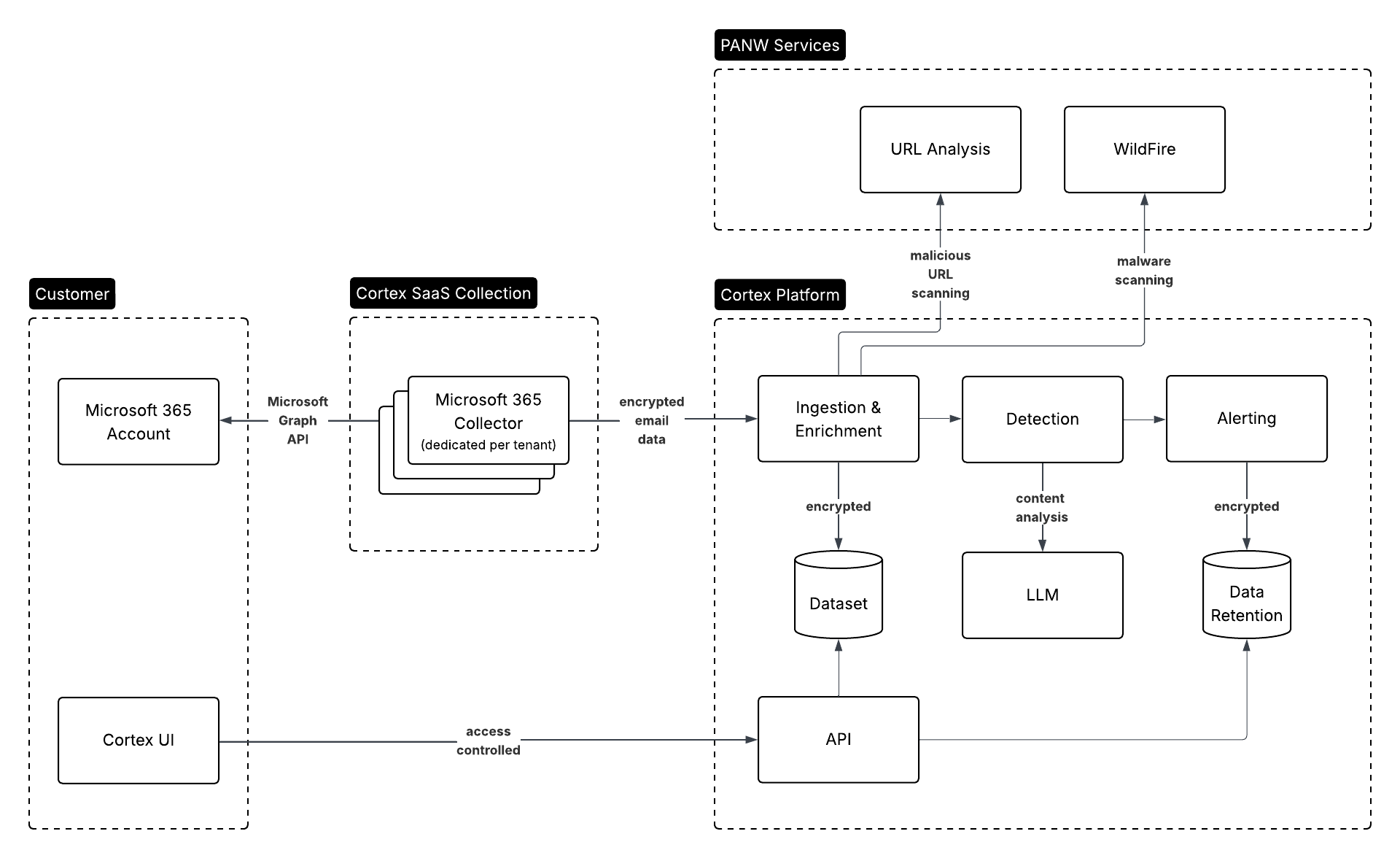
Data collector
The data collector connects to the email platform via secure APIs to ingest message metadata, content, URLs, attachments, authentication verdicts, and user context (for example, group membership, privilege level). Collection occurs on a continuous basis with support for incremental deltas where applicable.
Detection engines
The module supports a multi-layered detection architecture composed of three distinct detection engines, each focused on a different analytical layer:
* Artifact-based engine
* Analyzes discrete components embedded in the email such as file attachments and URLs.
* Leverages hash matching, sandbox integration (where available), and URL reputation systems to identify known or behaviorally malicious artifacts.
* Metadata Analytics engine
* Evaluates risk based on email metadata, sender-recipient relationship history, header anomalies, and identity context (for example, VIP status, role, group associations).
* Detects impersonation, spoofing, newly seen senders, and anomalous communication patterns based on statistical baselining and heuristic rules.
* Surfaces signals associated with business email compromise (BEC), supply chain impersonation, and domain lookalikes.
* LLM-based engine
* Processes the plain-text and HTML content of the email using large language models.
* Extracts semantic signals such as urgency, intent, emotional tone, and topic-based impersonation(for example, finance, HR, IT support).
* Feeds these high-level attributes into a broader social graph used to understand message deviation from historical tone and role-based communication patterns.
* Enhances detection of sophisticated phishing and text-only social engineering attacks that evade traditional signatures.
Issue processing and correlation layer
This layer normalizes output from the detection engines into a standardized issue format. It then correlates multiple issues into cases where shared indicators, for example, sender, URL, or theme, are identified. This layer also assigns a Score (using SmartScore) and enrichment metadata for downstream workflows.
Response engine
This engine executes response actions either automatically based on policy or manually via analyst intervention. It supports message removal, sender blocking, and false positive handling where platform permissions allow. All actions are logged with timestamp, executor, and result status.
User interface and admin console
The module includes a web-based management interface for the following:
* Viewing Issues and case timelines
* Investigating threat artifacts
* Configuring detection policies
* Managing exclusions and remediation rules
* Monitoring dashboard statistics and risky user profiles
---
# Agent Instructions
This documentation is published with GitBook. GitBook is the documentation platform designed so that both humans and AI agents can read, navigate, and reason over technical content effectively. Learn more at gitbook.com.
## Querying This Documentation
If you need additional information that is not directly available in this page, you can query the documentation by asking a question.
Perform an HTTP GET request on the following URL with the `ask` and `goal` query parameters:
```
GET https://cortex-docs.paloaltonetworks.com/cortex-xsiam/detect-investigate-and-respond-to-threats/cortex-advanced-email-security/cortex-advanced-email-security-module-architecture-and-data-flow.md?ask=&goal=
```
`ask` is the immediate question: it should be specific, self-contained, and written in natural language.
`goal` is what the user is ultimately trying to achieve, the reason they need the answer. Sharing it helps GitBook give you a better, more relevant answer. A goal is most helpful when it describes the outcome the user wants rather than restating the question. For example, with `ask=how do I create an API token`, a goal like `automate deployments from our CI pipeline` lets GitBook tailor the answer to that use case.
The response will contain a direct answer to the question and relevant excerpts and sources from the documentation.
Use this mechanism when the answer is not explicitly present in the current page, you need clarification or additional context, or you want to retrieve related documentation sections.