> For the complete documentation index, see [llms.txt](https://cortex-docs.paloaltonetworks.com/llms.txt). Markdown versions of documentation pages are available by appending `.md` to page URLs; this page is available as [Markdown](https://cortex-docs.paloaltonetworks.com/cortex-xsiam/onboard-cortex-xsiam/deployment-steps/cortex-xsiam-onboarding-checklist.md).
# Cortex XSIAM onboarding checklist
Cortex XSIAM onboarding checklist for activation, data source configuration, XDR agent deployment, and analytics setup.
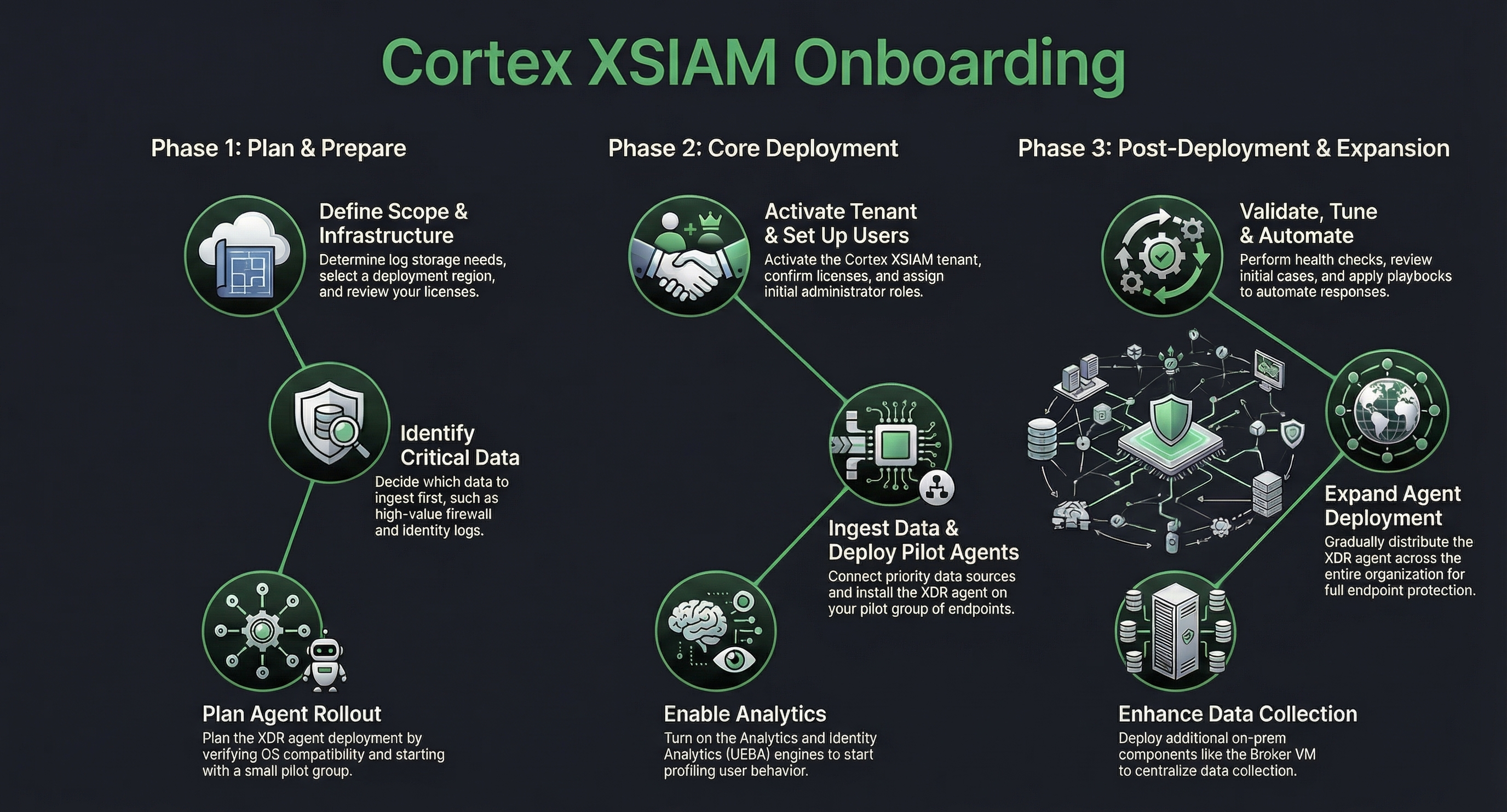
Use this Cortex XSIAM onboarding checklist to plan, deploy, and configure your security operations environment. Complete activation, data source configuration, Cortex XDR agent deployment, and analytics setup.
{% hint style="warning" %}
This checklist does not include any specific Cloud Security requirements. If you have a Cortex XSIAM Premium license or another XSIAM license with Cloud Posture Security/Runtime, you should also onboard Cloud Posture Security and Runtime during or after completing this stage. For more information about Cloud Security onboarding, see [Cloud service provider (CSP) onboarding](/cortex-xsiam/configure-cortex-xsiam/cortex-xsiam-data-sources/cloud-service-provider-csp-onboarding.md).
{% endhint %}
### Cortex XSIAM deployment checklist
This deployment phase sets up Cortex XSIAM infrastructure, data pipelines, endpoint protection, and security analytics.
| Step | Details | See More |
| ------------------------------------------ | ------------------------------------------------------------------------------------------------------------------------------------------------------------------------------------------------------------------------------------------------------------------------------------------------------------------------------------------------------------------------------------------------------------------------------------------------------------------------------------------------------------------------------------------------------------------------------------------------------------------------------------------------------------------------------------------------------------------------------------------------------------------------------------------------------------------------------------------------------------------------------------------------------------------------------------------------------------------------------------------------------------------------------------------------------------------------------------------------------------------------------------------------------------------------------------------------------------------------------------------------------------------------------------------------------------------------------------------------------------------------------------------------------------------------------------------------------------------------------------------------------------------------------------------------------------------------------------------------------------------------------------------------------------------------------------------------------------------------------------------------------------------------------------------------------------------------------------------------------------------ | ------------------------------------------------------------------------------------------------------------------------------------------------------------------------------------------------------------------------------------------------------------------------------------------------------------------------------------------------------------------------------------------------------------------------------------------------------------------------------------------------------------------------------------------------------------------------------------------------------------------------------------------------------------------------------------------------------------------------------------------------------------------------------------------------------------------------------------------------------ |
| 1. Activation and initial setup | ✅ In the Cortex Gateway, activate Cortex XSIAM and confirm license status.
✅ Enable access to required PANW resources and set up encryption keys (BYOK), if required.
✅ Assign initial administrator and analyst-type user roles (Responder/Investigator), create user groups, and assign roles to those groups (recommended) to a limited number of users initially. You can update this later.
✅ Set up access through the Customer Support Portal or SAML single sign-on.
| Activate Cortex XSIAM
Enable access to required PANW resources
Set up users and roles
Set up authentication
|
| 2. Configure content | Use the Data Sources Onboarding wizard to configure the following:
✅ Priority content:
- Configure network security data, such as Palo Alto Networks Next-Generation Firewalls, and network devices.
- Configure identity and user data. Install the Cloud Identity Engine (optional and highly recommended), which provides the necessary Active Directory or Microsoft Entra ID/Okta context (user names, group membership, computer names) to map a raw event (for example, an IP address) to a user or asset.
✅ Highly recommended content:
- Connect cloud audit logs for the most critical providers, such as AWS CloudTrail, Azure Activity Logs, and Google Cloud Audit Logs, directly to Cortex XSIAM.
- Configure/enable a key Threat Intelligence feed, such as the Unit 42 Intelligence feed, to enrich incoming issues. This ensures that as soon as a log/alert hits the Data Lake, it has the latest malicious context.
| |
| 3. Deploy the XDR agent | ✅ Install the XDR agent by creating XDR Agent installation packages for a small, diverse pilot group of endpoints and deploy the agent to a pilot group (phased rollout). Start with small, low-risk endpoints and extend, as required. Gradually expand agent distribution to larger groups that have similar attributes (hardware, software, and users). At the end of two weeks, you can have Cortex XSIAM deployed on up to 100 endpoints.
✅ After testing expected agent behavior and performance, review and select default endpoint security profiles (Exploit, Malware, Restrictions, Agent Settings, Exceptions) to begin protecting your endpoints from threats immediately. Once endpoints are deployed and start collecting data, you can make any necessary adjustments to these rules and policies.
✅ Verify endpoint data collection (logs, alerts, events) is flowing from deployed agents to the XSIAM Data Lake. After deploying the agents to the pilot group, set up data collection to analyze the data.
This provides granular event data (process execution, file activity, registry changes, network connections) necessary for EDR/XDR detection and Behavioral Indicators of Compromise (BIOCs).
| |
| 4. Enable Analytics and Identity Analytics | ✅ Enable Cortex XSIAM Analytics engine (if not already enabled).
The analytics engine accesses your logs as they are streamed to Cortex XSIAM, including firewall data, and analyzes them as soon as they arrive.
You need EDR or network logs from at least 30 endpoints over a minimum of 2 weeks, or Cloud audit logs over a minimum of 2 weeks.
✅ Enable Identity Analytics, which focuses on user behavior that is critical since attackers primarily target credentials. It has two main functions:
- User/Entity Behavior Analytics (UEBA): Profiles users, hosts, and groups based on identity data and flags anomalies like a user logging in from a new country (Impossible Traveler), accessing an unusual database, or transferring a massive file volume outside of their norm.
Investigation context: When an issue fires, Identity Analytics ensures that the relevant user profile details, recent activities, and group membership are automatically aggregated and displayed with a user-based Analytics type issue and Analytics BIOC rule
The Cloud Identity Engine must be set up.
✅ Enable the Identity Threat Detection and Response (ITDR) add-on (optional), which enhances the analytics baseline capabilities to include the Directory Infrastructure. This enables the detection of advanced attacks targeting Domain Controllers and other identity components.
In addition, the ITDR module integrates proactive capabilities by using attack surface management to identify and expose identity-related security flaws and vulnerabilities before they can be exploited.
| |
Your Cortex XSIAM is now operational and is collecting data.
---
# Agent Instructions
This documentation is published with GitBook. GitBook is the documentation platform designed so that both humans and AI agents can read, navigate, and reason over technical content effectively. Learn more at gitbook.com.
## Querying This Documentation
If you need additional information that is not directly available in this page, you can query the documentation by asking a question.
Perform an HTTP GET request on the following URL with the `ask` and `goal` query parameters:
```
GET https://cortex-docs.paloaltonetworks.com/cortex-xsiam/onboard-cortex-xsiam/deployment-steps/cortex-xsiam-onboarding-checklist.md?ask=&goal=
```
`ask` is the immediate question: it should be specific, self-contained, and written in natural language.
`goal` is what the user is ultimately trying to achieve, the reason they need the answer. Sharing it helps GitBook give you a better, more relevant answer. A goal is most helpful when it describes the outcome the user wants rather than restating the question. For example, with `ask=how do I create an API token`, a goal like `automate deployments from our CI pipeline` lets GitBook tailor the answer to that use case.
The response will contain a direct answer to the question and relevant excerpts and sources from the documentation.
Use this mechanism when the answer is not explicitly present in the current page, you need clarification or additional context, or you want to retrieve related documentation sections.