> For the complete documentation index, see [llms.txt](https://cortex-docs.paloaltonetworks.com/llms.txt). Markdown versions of documentation pages are available by appending `.md` to page URLs; this page is available as [Markdown](https://cortex-docs.paloaltonetworks.com/cortex-xsiam/onboard-cortex-xsiam/post-deployment/post-deployment-checklist.md).
# Cortex XSIAM post-deployment checklist
Use this Cortex XSIAM post-deployment checklist for health checks, automations, case triage, XDR agent rollout, and integrations.
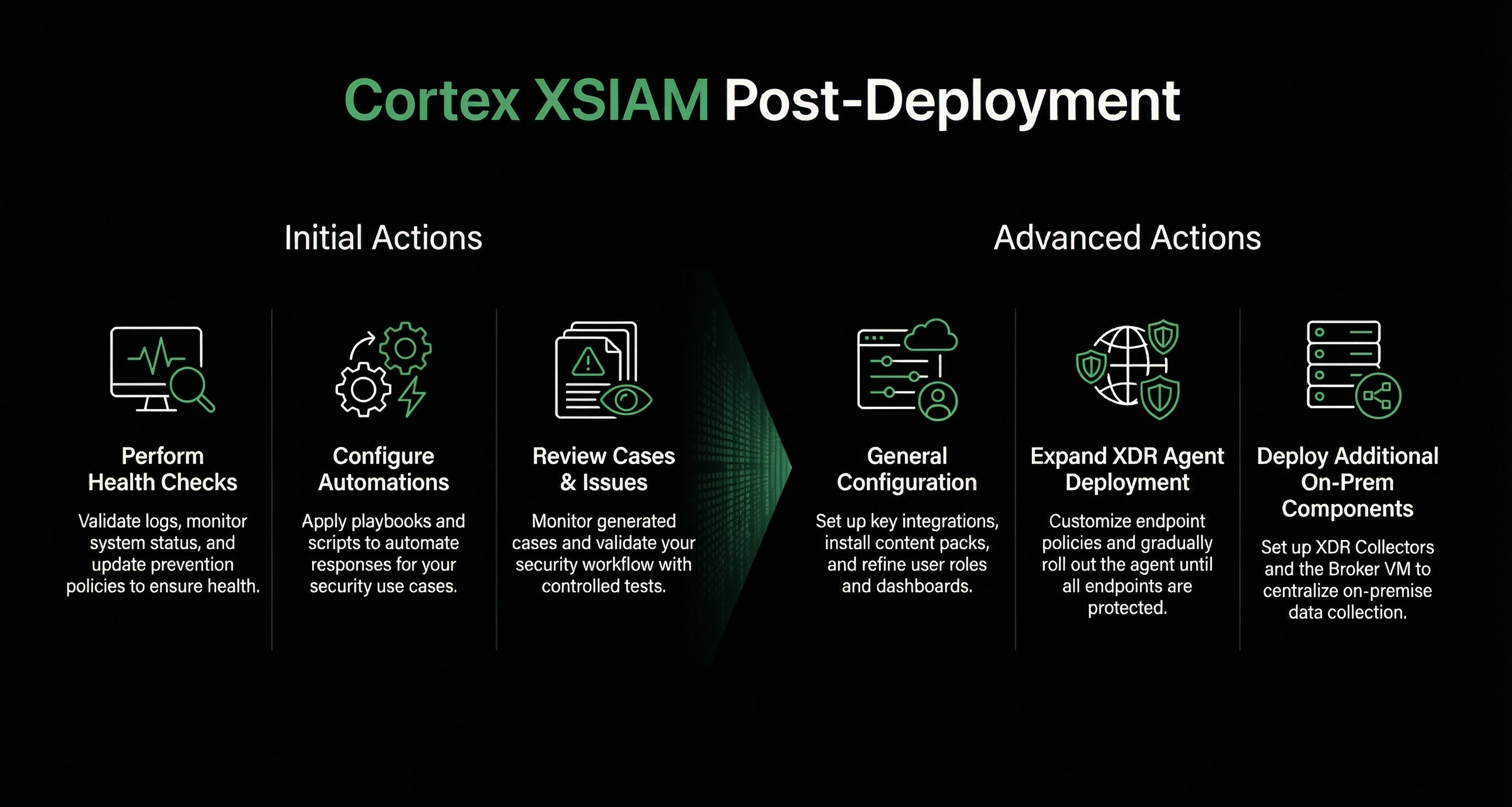
Use this Cortex XSIAM post-deployment checklist after onboarding. Start with health checks and case triage. Then configure integrations, expand the Cortex XDR agent rollout, and deploy on-premises components.
{% hint style="info" %}
This checklist includes post-deployment for the Cortex XSIAM environment, but does not include any specific Cloud Security requirements. For more information about Cloud Security onboarding, see [Cloud service provider (CSP) onboarding](/cortex-xsiam/configure-cortex-xsiam/cortex-xsiam-data-sources/cloud-service-provider-csp-onboarding.md).
{% endhint %}
### Initial Cortex XSIAM post-deployment actions
The following table describes the post-deployment steps for the most critical areas to get you up and running quickly.
| Action | Details | See More |
| ----------------------- | --------------------------------------------------------------------------------------------------------------------------------------------------------------------------------------------------------------------------------------------------------------------------------------------------------------------------------------------------------------------------------------------------------------------------------------------------------------------------------------------------------------------------------------------------------------------------------------------------------------------------------------------------------------------------------------------------------------------------------------------------------------------------------------------------------------------------------------------------------------------------------------------------------------------------------------------------------------------------------------------------------------------------------------------------------------------------------------------------------------------------------------------------------------------------------------------------------------------------------------- | ---------------------------------------------------------------------------------------------------------------------------------------------------------------------------------------------------------------------------------------------------------------------------------------------------------------------------------------------------------------------------------------------------------------------------------------------------------------------------------------------------------- |
| Perform health checks | ✅ Validate logs, detectors, and update prevention policies. It is recommended to perform health checks, including updating prevention policies, monitoring operational status, and validating detectors for any issues or cases. | [Perform health checks](/cortex-xsiam/onboard-cortex-xsiam/post-deployment/perform-health-checks.md) |
| Configure automations | ✅ Review the different types of automations (playbooks and scripts) and apply automation rules to your use case. | [Create an automation rule](/cortex-xsiam/configure-cortex-xsiam/automations/create-an-automation-rule.md) |
| Review cases and issues | ✅ Monitor the Cases page for new, generated cases (grouped issues) and begin basic triage exercises with the analyst team. Look for cases or issues that were generated.
✅ Check that your automation rules are working as expected and reflect the cases for your use case. Check whether your playbooks are responding to alerts and incidents as expected.
✅ Validate your workflow. Start with Widfire testing to confirm the security controls and sandbox integration are functional and working as expected. For example, acquire a safe, benign sample unknown to Wildfire, attempt to execute it, and confirm that the XDR agent’s malware prevention file intercepts the execution. Confirm that a case/issue was generated and the file verdict is populated.
✅ Review and test the default Behavioral Indicators of Compromise (BIOC). Review severity levels and exceptions on pre-built BIOCs to minimize false positives, especially for legitimate administrative tools and scripts.
✅ Review and test the default Indicator of Compromise (IOC) rules. Ensure all known bad indicators from historical incidents or key threat intelligence feeds are loaded, enabled, and prioritized.
| Analyze and resolve cases
What's a BIOC?
What's an IOC?
|
### Advanced Cortex XSIAM post-deployment actions
General
This section includes general post-deployment steps, such as server and security settings, configuring dashboards, and refining RBAC roles.
| Action | Details | See More |
| ---------------------------- | ------------------------------------------------------------------------------------------------------------------------------------------------------------------------------------------------------------------------------------------------------------------------------------------------------------------------------------------------------------------------------------------------------------------------------------------------------------------------------------------------------------------- | ----------------------------------------------------------------------------------------------------------------------------------------------------------------------------------------------------------------------------------------------------------------------------- |
| Set up relevant integrations | ✅ Install essential content packs (for example, common security use cases or SOAR playbook) and configure relevant integrations, from the Data Sources catalog.
If your use case is not in the Data Sources catalog, you can install content from Marketplace. For example, if you require content packs such as Phishing and Malware, you need to download the pack from Marketplace and configure the integration. The Data Sources catalog includes the most used data sources to help you onboard.
| [What are Cortex XSIAM data sources?](/cortex-xsiam/configure-cortex-xsiam/cortex-xsiam-data-sources/what-are-cortex-xsiam-data-sources.md) |
| Update users and roles | ✅ Review and configure users, roles, and user groups as required. Each role extends specific privileges to users. The way you configure administrative access depends on your organization's security requirements. Use roles to assign specific access privileges to administrative user accounts. | [Manage user roles and access management](/cortex-xsiam/onboard-cortex-xsiam/post-deployment/manage-user-roles-and-access-management.md) |
| Dashboards | ✅ Review and configure dashboards and ensure you can visualize activity from your active log sources (for example, VPN logins, Firewall blocks). | [Overview of dashboards and reports](/cortex-xsiam/detect-investigate-and-respond-to-threats/monitor-dashboards-and-reports/overview-of-dashboards-and-reports.md) |
| Server and security settings | ✅ Customize and configure Cortex XSIAM for a more personalized user experience:
- Server settings, such as the timezone, the timestamp format, password protection, and custom logos for communication task emails.
- Security settings, such as allowed domains, allowed sessions, and user expiration.
| |
| Log forwarding | ✅ Set up sending logs to an external service, such as a Slack channel or an email distribution list. | [Forward logs and data from Cortex XSIAM to external services](/cortex-xsiam/onboard-cortex-xsiam/post-deployment/data-and-log-forwarding.md#UUID-8cf9dc23-530e-9c23-89bc-9ebfccd6b949) |
Expand the XDR Agent deployment
This stage involves customizing policies and gradually rolling out the XDR Agent to all users.
| Action | Details | See More |
| ------------------------------------------------- | --------------------------------------------------------------------------------------------------------------------------------------------------------------------------------------------------------------------------------------------------------------------------------------------------------------------------------------------------------------------------------------------------------------------------------------------------------------------------------------------------------------------------------------------------------------------------------------------------------------------------------------------------- | -------------------------------------------------------------------------------------------------------------------------------------------------------------------------------- |
| Customize endpoint security profiles and policies | ✅ Review your policy rules and the security profiles assigned to these rules and make any necessary adjustments. After the pilot group has been running for about a week, analyze the cases and issues that were generated. You may find issues with benign activity, such as in-house applications or custom scripts. Do the following:
- Create exceptions to prevent false positives
- Start building your primary prevention policies to suit your use case as necessary
| [Set up endpoint profiles and exception rules](/cortex-xsiam/protect-your-endpoints/endpoint-security/install-and-manage-endpoints.md#UUID-8e42879c-93b8-fb0c-baff-1fe6544db66d) |
| Expand the agent deployment | ✅ Expand the Agent deployment to larger groups for initial data collection. | |
| Define endpoint groups | ✅ (Optional, can be performed post-deployment) Define an endpoint group to apply policy rules and manage specific endpoints.
Instead of managing security policies and configurations for each device, you can manage them for the entire group. For example, create a High-Security Prevention Profile and apply it to an entire group, Critical Financial Servers.
Note
If you set up Cloud Identity Engine, you can also leverage your Active Directory user, group, and computer details in endpoint groups.
Deploy additional On-prem components
Deploy additional on-prem components for data ingestion, collection, and automation for complete protection. Although these components are optional, XDR Collectors and the Broker VM are critical for this next deployment phase. The Broker VM is often highly recommended early on because it can solve immediate connectivity and log collection challenges for on-prem identity sources.
| Action | Details | |
| ---------------------------------------------------------------- | ---------------------------------------------------------------------------------------------------------------------------------------------------------------------------------------------------------------------------------------------------------------------------------------------------------------------------------------------------------------------------------------------------------------------------------------------------------------------------------------------------------------------------------------------------------------------------------------------------- | ----------------------------------------------------------------------------------------------------------------------------------------------------------- |
| Set up XDR Collectors for specific Windows/Linux logs (optional) | ✅ Set up XDR Collectors (XDRCs), which are installed directly on a Windows or Linux machine to collect log files from that machine's local file system. They are crucial for ingesting detailed Windows and Linux event logs from systems where the full Cortex XDR Agent may not be deployed, or to collect specific log types, complementing agent data.
✅ After installing XDRCs, create/configure a profile and apply it to a policy. The XDRC then starts collecting and forwarding the logs to Cortex XSIAM.
| [XDR Collectors](/cortex-xsiam/configure-cortex-xsiam/cortex-xsiam-data-sources/generic-on-premise-data-collectors/xdr-collectors/manage-xdr-collectors.md) |
| Set up and configure Broker VM (optional but highly recommended) | ✅ Set up the Broker VM, which functions as a secure on-prem gateway for Cortex XSIAM. It centralizes on-prem data collection by running applets to ingest logs from on-prem security devices and services that can’t send data directly to the cloud. It also allows secure agent proxy and communication located in restricted or air-gapped networks to communicate securely with the Cortex XSIAM tenant.
Note
You can also use the Broker VM for high availability.
✅ Deploy an engine if you have specific automation and feed integrations, scripts, or playbooks that execute actions or fetch data directly from resources within your internal network (for example, querying an on-prem Active Directory, isolating a machine via a local tool).
An engine is a proxy server application that is installed on a remote machine, enabling communication between the remote machine and the Cortex XSIAM tenant. You can run playbooks, scripts, commands, and integrations on the remote machine, and the results are returned to the tenant.
| [What is an engine?](/cortex-xsiam/configure-cortex-xsiam/engines/what-is-an-engine.md) |
After completing the post-deployment steps, you can now start configuring Cortex XSIAM.
---
# Agent Instructions
This documentation is published with GitBook. GitBook is the documentation platform designed so that both humans and AI agents can read, navigate, and reason over technical content effectively. Learn more at gitbook.com.
## Querying This Documentation
If you need additional information that is not directly available in this page, you can query the documentation by asking a question.
Perform an HTTP GET request on the following URL with the `ask` and `goal` query parameters:
```
GET https://cortex-docs.paloaltonetworks.com/cortex-xsiam/onboard-cortex-xsiam/post-deployment/post-deployment-checklist.md?ask=&goal=
```
`ask` is the immediate question: it should be specific, self-contained, and written in natural language.
`goal` is what the user is ultimately trying to achieve, the reason they need the answer. Sharing it helps GitBook give you a better, more relevant answer. A goal is most helpful when it describes the outcome the user wants rather than restating the question. For example, with `ask=how do I create an API token`, a goal like `automate deployments from our CI pipeline` lets GitBook tailor the answer to that use case.
The response will contain a direct answer to the question and relevant excerpts and sources from the documentation.
Use this mechanism when the answer is not explicitly present in the current page, you need clarification or additional context, or you want to retrieve related documentation sections.