> For the complete documentation index, see [llms.txt](https://cortex-docs.paloaltonetworks.com/llms.txt). Markdown versions of documentation pages are available by appending `.md` to page URLs; this page is available as [Markdown](https://cortex-docs.paloaltonetworks.com/cortex-xsoar-8-saas/multi-tenant/child-tenant-management.md).

# Child tenant management

#### Manage child tenants in the Cortex Gateway

In Cortex Gateway, you can manage all tenants, including main and child tenants, permissions, roles, and user groups.

1. Go to the Cortex Gateway.
2. Locate the main tenant and then hover over the child tenant.
3. Select one of the following:

   * Delete

     When you delete a tenant, the selected child tenant is permanently deleted with all its data. Before deleting you are prompted to confirm that you want to delete the tenant.
   * Manage Incident Retention Licenses

     You can assign the license to the child tenant if you have purchased an incident retention license.

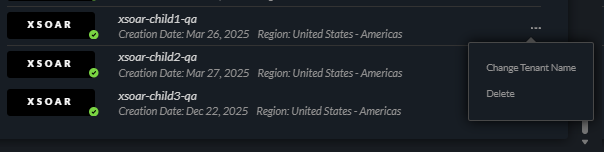
   <div data-gb-custom-block data-tag="hint" data-style="info" class="hint hint-info"><p>You can change an existing child tenant's name by clicking the three dot menu in the Cortex Gateway and selecting <strong>Change Tenant Name</strong>. Changing the child tenant name may result in a short downtime.</p><p><img src="/files/V6b3AM2fb6SAcqpZo5Sp" alt="change_tenant_name.png" data-size="original"></p></div>
4. To update user permissions, roles, and user groups, click **Permission Management**.

   <div data-gb-custom-block data-tag="hint" data-style="info" class="hint hint-info"><p>Roles, permissions, and user groups are propagated to child tenants if the roles and user groups are created in the Cortex Gateway, but not if they were created in the Main Tenant. For more information about the Cortex Gateway, see <a href="/spaces/gHZkkpS9tCAU2tRJlYSx/pages/rOwH0hEVNXVSU7NNY8D0">Users and Roles</a>.</p></div>

#### Manage child tenants from the main tenant

After you have set up and configured Cortex XSOAR multi-tenant, you can manage the following:

* Manage investigations: From the main tenant, you can see all tenants' incidents and indicators. You do not need to switch between tabs or screens to view data for child tenants. You can also pivot to any child tenant, subject to permission for those tenants.
* Manage content: On the **Tenant Management** page, add propagation labels to child tenants, remote repositories, and content, and then sync the content from the main tenant to child tenants.

In Cortex XSOAR, you can use the **Tenant Navigator** to switch directly to another tenant. The Tenant Navigator includes the following options:

* Pivot to the Cortex Gateway
* Pivot to the Customer Support Portal
* Pivot to another tenant

  Cortex XSOAR tenants to which you have access are divided according to your CSP account. A search option is available If there are more than 5 tenants available. If there are more than 5 tenants within a specific account, a list of tenants is available for that CSP account. Tenants include child tenants and Dev/Prod.

  The tenant that you are using is marked by a green **Active Session** label.

{% hint style="info" %}
In the main tenant, you can pivot to a child tenant from specific pages, such as Incidents and Dashboards. For example, on the **Dashboards** page, click **Main Tenant** and then click the child tenant you want to navigate to.
{% endhint %}


---

# Agent Instructions
This documentation is published with GitBook. GitBook is the documentation platform designed so that both humans and AI agents can read, navigate, and reason over technical content effectively. Learn more at gitbook.com.

## Querying This Documentation
If you need additional information that is not directly available in this page, you can query the documentation dynamically by asking a question.

Perform an HTTP GET request on the current page URL with the `ask` query parameter, and the optional `goal` query parameter:

```
GET https://cortex-docs.paloaltonetworks.com/cortex-xsoar-8-saas/multi-tenant/child-tenant-management.md?ask=<question>&goal=<endgoal>
```

`ask` is the immediate question: it should be specific, self-contained, and written in natural language.
`goal` is optional and describes the broader end goal you are ultimately trying to accomplish on behalf of the user. GitBook uses it to tailor the answer towards what is most useful for that goal.

The response will contain a direct answer to the question and relevant excerpts and sources from the documentation.

Use this mechanism when the answer is not explicitly present in the current page, you need clarification or additional context, or you want to retrieve related documentation sections.