> For the complete documentation index, see [llms.txt](https://cortex-docs.paloaltonetworks.com/llms.txt). Markdown versions of documentation pages are available by appending `.md` to page URLs; this page is available as [Markdown](https://cortex-docs.paloaltonetworks.com/xsoar-6-administrator-guide/6.14/onboard-cortex-xsoar/users-and-roles/authenticate-users-with-saml-2.0/set-up-microsoft-entra-id-as-the-identity-provider-using-saml-2.0/configure-the-saml-2.0-integration-for-microsoft-entra-id/saml-2.0-microsoft-entra-id-parameters.md).

# SAML 2.0 Microsoft Entra ID Parameters

The following table describes the SAML 2.0 parameters for Microsoft Entra ID, when adding a new instance in Cortex XSOAR:

| Attribute                                          | Description                                                                                                                                                                                                                                                                                                                                                                                                                                                                                                                                                           |
| -------------------------------------------------- | --------------------------------------------------------------------------------------------------------------------------------------------------------------------------------------------------------------------------------------------------------------------------------------------------------------------------------------------------------------------------------------------------------------------------------------------------------------------------------------------------------------------------------------------------------------------- |
| Name                                               | A name for the integration instance.                                                                                                                                                                                                                                                                                                                                                                                                                                                                                                                                  |
| Service Provider Entity ID                         | The URL of your Cortex XSOAR server (also known as an ACS URL). In the format: **`https://yourdomain.com/saml`**                                                                                                                                                                                                                                                                                                                                                                                                                                                      |
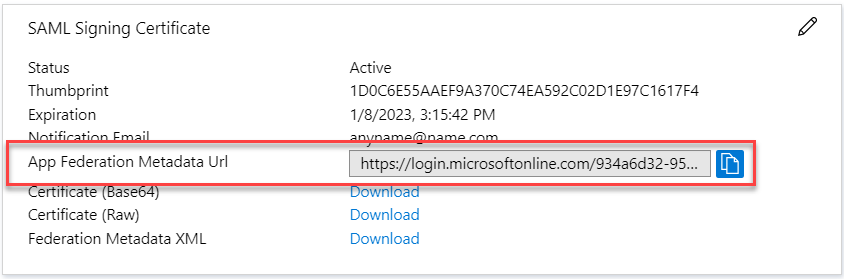
| IdP metadata URL                                   | <p>The URL of your organization’s IdP metadata file. Copy this from the <strong>App Federation Metadata URL</strong> in the <strong>SAML Signing Certificate</strong> in Microsoft Entra ID.</p><p><img src="/files/FautWBYlGgWaagisHPgb" alt="azure_sso_s3a.png" data-size="original"></p>                                                                                                                                                                                                                                                                           |
| IdP metadata file                                  | Your organization’s IdP metadata file. You either need to add the IdP metadata URL or the file.                                                                                                                                                                                                                                                                                                                                                                                                                                                                       |
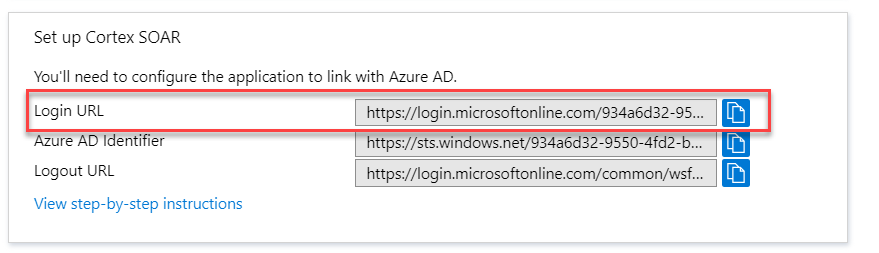
| IdP SSO URL                                        | <p>The URL of the IdP application that corresponds to Cortex XSOAR. Copy this from the <strong>Login URL</strong> field in the <strong>SAML Signing Certificate</strong> section.</p><p><img src="/files/wvC9fZdAkCeqcgqZ0SYg" alt="azure_sso_s4.png" data-size="original"></p>                                                                                                                                                                                                                                                                                       |
| Attribute to get username                          | Attribute in your IdP for the user name. Copy this URL from the User Attributes & Claims section. See step 4.10 (additional claim details) in [Configure Microsoft Entra ID to Authenticate Cortex XSOAR](/xsoar-6-administrator-guide/6.14/onboard-cortex-xsoar/users-and-roles/authenticate-users-with-saml-2.0/set-up-microsoft-entra-id-as-the-identity-provider-using-saml-2.0/configure-microsoft-entra-id-to-authenticate-cortex-xsoar.md). For example, **`http://schemas.xmlsoap.org/ws/2005/05/identity/claims/givenname`**.                                |
| Attribute to get email                             | Attribute in your IdP for the user's email address. Copy this URL from the User Attributes & Claims section. See step 4.10 (additional claim details) in [Configure Microsoft Entra ID to Authenticate Cortex XSOAR](/xsoar-6-administrator-guide/6.14/onboard-cortex-xsoar/users-and-roles/authenticate-users-with-saml-2.0/set-up-microsoft-entra-id-as-the-identity-provider-using-saml-2.0/configure-microsoft-entra-id-to-authenticate-cortex-xsoar.md). For example, **`http://schemas.xmlsoap.org/ws/2005/05/identity/claims/emailaddress`**.                  |
| Attribute to get first name                        | Attribute in your IdP for the user's first name. Copy this URL from the User Attributes & Claims section. See step 4.10 (additional claim details) in [Configure Microsoft Entra ID to Authenticate Cortex XSOAR](/xsoar-6-administrator-guide/6.14/onboard-cortex-xsoar/users-and-roles/authenticate-users-with-saml-2.0/set-up-microsoft-entra-id-as-the-identity-provider-using-saml-2.0/configure-microsoft-entra-id-to-authenticate-cortex-xsoar.md). For example, **`http://schemas.xmlsoap.org/ws/2005/05/identity/claims/name`**.                             |
| Attribute to get last name                         | Attribute in your IdP for the user's last name. Copy this URL from the User Attributes & Claims section. See step 4.10 (additional claim details) in [Configure Microsoft Entra ID to Authenticate Cortex XSOAR](/xsoar-6-administrator-guide/6.14/onboard-cortex-xsoar/users-and-roles/authenticate-users-with-saml-2.0/set-up-microsoft-entra-id-as-the-identity-provider-using-saml-2.0/configure-microsoft-entra-id-to-authenticate-cortex-xsoar.md). For example, **`http://schemas.xmlsoap.org/ws/2005/05/identity/claims/name`**.                              |
| Attribute to get phone                             | (Optional) Attribute in your IdP for the user's phone number, if available. Copy this URL from the User Attributes & Claims section. See step 4.10 (additional claim details) in [Configure Microsoft Entra ID to Authenticate Cortex XSOAR](/xsoar-6-administrator-guide/6.14/onboard-cortex-xsoar/users-and-roles/authenticate-users-with-saml-2.0/set-up-microsoft-entra-id-as-the-identity-provider-using-saml-2.0/configure-microsoft-entra-id-to-authenticate-cortex-xsoar.md). For example, **`http://schemas.xmlsoap.org/ws/2005/05/identity/claims/phone`**. |
| Attribute to get groups                            | Attribute in your IdP for the groups of which the user is a member. Copy this URL from the User Attributes & Claims section. See step 4.10 (additional claim details) in [Configure Microsoft Entra ID to Authenticate Cortex XSOAR](/xsoar-6-administrator-guide/6.14/onboard-cortex-xsoar/users-and-roles/authenticate-users-with-saml-2.0/set-up-microsoft-entra-id-as-the-identity-provider-using-saml-2.0/configure-microsoft-entra-id-to-authenticate-cortex-xsoar.md). For example, **`http://schemas.microsoft.com/ws/2008/06/identity/claims/role`**.        |
| Groups delimiter                                   | Groups list separator. Value: **`“,”`**                                                                                                                                                                                                                                                                                                                                                                                                                                                                                                                               |
| Default role (for IdP users without groups)        | Role to assign to the user when they are not a member of any group. For example, **`Analyst`**.                                                                                                                                                                                                                                                                                                                                                                                                                                                                       |
| RelayState                                         | Only used by certain IdPs. If your IdP uses relay state, you need to supply the relay state.                                                                                                                                                                                                                                                                                                                                                                                                                                                                          |
| Verify IDP public certificate                      | The Certificate (Base64) you downloaded in step 5.5 in [Configure Microsoft Entra ID to Authenticate Cortex XSOAR](/xsoar-6-administrator-guide/6.14/onboard-cortex-xsoar/users-and-roles/authenticate-users-with-saml-2.0/set-up-microsoft-entra-id-as-the-identity-provider-using-saml-2.0/configure-microsoft-entra-id-to-authenticate-cortex-xsoar.md).                                                                                                                                                                                                           |
| Sign Request                                       | Method for the IdP to verify the user sign-in request using the IdP vendor certificate.                                                                                                                                                                                                                                                                                                                                                                                                                                                                               |
| Service Provider Private key (pem format)          | Private key for your IdP, in PEM format. Created locally by the user who wants to use SAML. The public key is uploaded to Microsoft Entra ID.                                                                                                                                                                                                                                                                                                                                                                                                                         |
| Do not validate server certificate (insecure)      | If you are use a self-signed certificate for the Microsoft Entra ID server you can use this checkbox.                                                                                                                                                                                                                                                                                                                                                                                                                                                                 |
| Use system proxy settings                          | Select the check box to use proxy settings.                                                                                                                                                                                                                                                                                                                                                                                                                                                                                                                           |
| ADFS                                               | Whether the server uses ADFS.                                                                                                                                                                                                                                                                                                                                                                                                                                                                                                                                         |
| Compress encode URL (AFDS)                         | (Manadatory) Select the check box to compress encode URL (AFDS). If not, you may receive a **`Decoding Flat`** error during connection.                                                                                                                                                                                                                                                                                                                                                                                                                               |
| Service identifier (AFDS)                          | Add the characters after the **`appid`** value, which can be found at the end of the App Federation Metadata URL. For example, **`https://login.microsoftonline.com/934a6d32-9550be/federationmetadata/2007-06/federationmetadata.xml?appid=b0331331-f15b-4a32-9f48-19158beb0340`**. Add **`b0331331-f15b-4a32-9f48-19158beb0340`**                                                                                                                                                                                                                                   |
| Don’t map SAML groups to Demisto roles             | SAML groups are not mapped to Cortex XSOAR roles. Default roles are assigned and you can select them later.                                                                                                                                                                                                                                                                                                                                                                                                                                                           |
| Get service provider metadata                      | Enables you to verify that the settings are successful.                                                                                                                                                                                                                                                                                                                                                                                                                                                                                                               |
| IdP Single Logout URL                              | This functionality ends the user's session in Microsoft Entra ID when logging out.                                                                                                                                                                                                                                                                                                                                                                                                                                                                                    |
| Single Logout Service Endpoint                     | The URL of the single logout Endpoint.                                                                                                                                                                                                                                                                                                                                                                                                                                                                                                                                |
| Use this instance for external authentication only | Limits this instance to authenticate external (non-Cortex XSOAR) users when they answer a survey sent via a communication task in a playbook.                                                                                                                                                                                                                                                                                                                                                                                                                         |


---

# Agent Instructions
This documentation is published with GitBook. GitBook is the documentation platform designed so that both humans and AI agents can read, navigate, and reason over technical content effectively. Learn more at gitbook.com.

## Querying This Documentation
If you need additional information that is not directly available in this page, you can query the documentation dynamically by asking a question.

Perform an HTTP GET request on the current page URL with the `ask` query parameter, and the optional `goal` query parameter:

```
GET https://cortex-docs.paloaltonetworks.com/xsoar-6-administrator-guide/6.14/onboard-cortex-xsoar/users-and-roles/authenticate-users-with-saml-2.0/set-up-microsoft-entra-id-as-the-identity-provider-using-saml-2.0/configure-the-saml-2.0-integration-for-microsoft-entra-id/saml-2.0-microsoft-entra-id-parameters.md?ask=<question>&goal=<endgoal>
```

`ask` is the immediate question: it should be specific, self-contained, and written in natural language.
`goal` is optional and describes the broader end goal you are ultimately trying to accomplish on behalf of the user. GitBook uses it to tailor the answer towards what is most useful for that goal.

The response will contain a direct answer to the question and relevant excerpts and sources from the documentation.

Use this mechanism when the answer is not explicitly present in the current page, you need clarification or additional context, or you want to retrieve related documentation sections.